
dsh-qa v0.7.2 is out. It supports Host Smoke against dsh-v0.2.0-rc.2 and fixes the discovery, preservation, ordering, and rendering of historical DSH conversations.
The official DeepSeek Harness desktop preview is also available to download from the product page.
DeepSeek Harness product page:https://www.deepseek.com/harness/
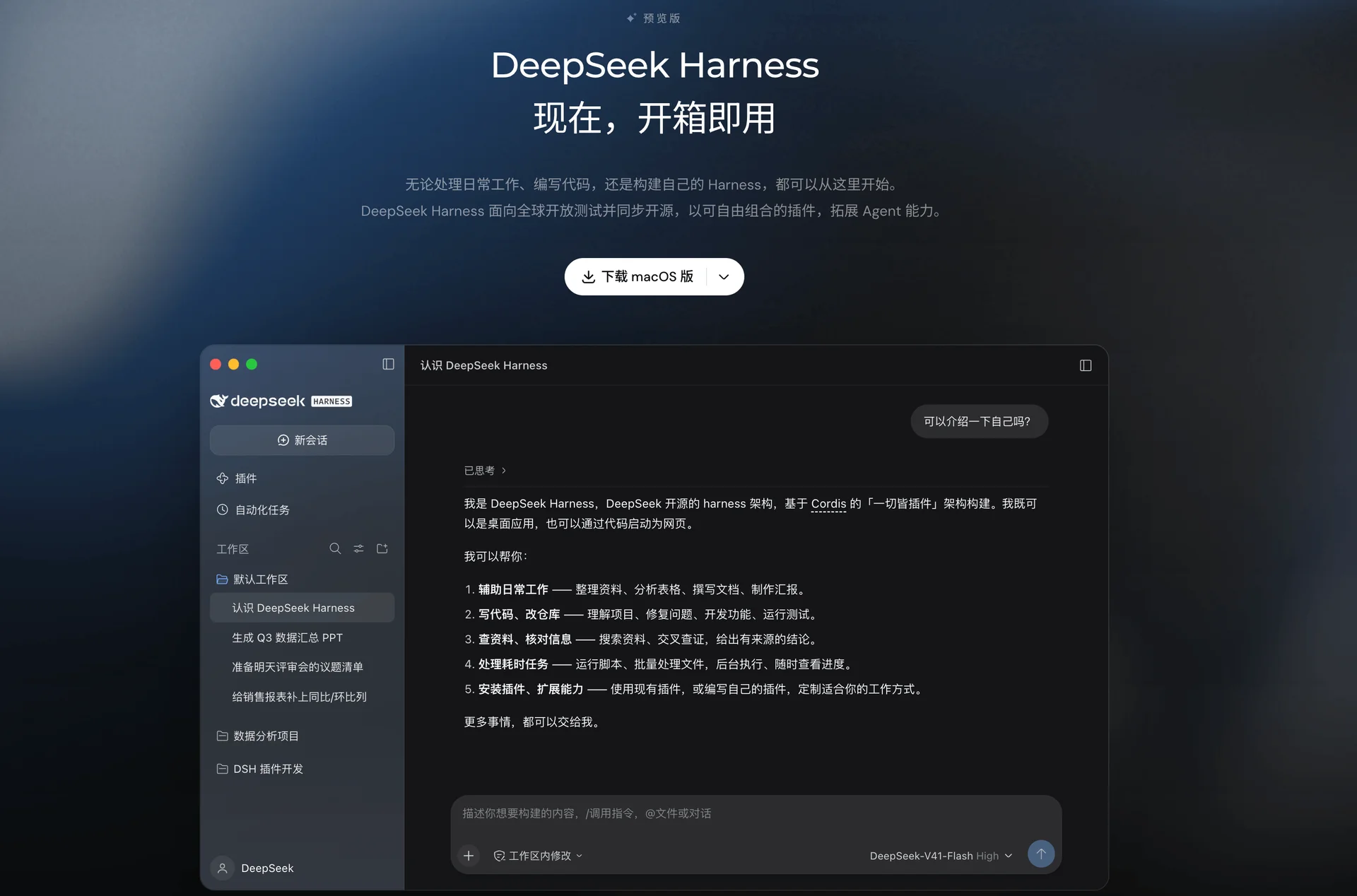
Desktop provides the installation entry point; dsh-qa continues to provide the QA workflow. Here is what changes on each side:
| Desktop entry | dsh-qa update |
|---|---|
| Download and open Harness from the official website | Use the latest QA Workbench with the current Harness host |
| Choose an official or custom model | Keep historical DSH conversations visible across sessions |
| Add dsh-qa through the Plugin entry | Validate the QA profile against a real Harness Host |
If you previously used Harness through the CLI or another local workflow, the official client makes it easier to get started. Once installed, choose a model mode and the Plugins you need.
One qualification matters:
DeepSeek Harness Desktop is a Preview release. It is suitable for evaluation and compatibility work, but it should not automatically replace every stable workflow.
DeepSeek Harness now has an official desktop client
DeepSeek Harness has evolved as an Agent runtime and development framework. For many users, the original path still involved a CLI, configuration files, a local runtime, and a browser window.
The official client turns that into a few steps: download and install the client, open Harness, sign in to a DeepSeek account or configure a custom model according to the mode you choose, then use Plugins, Skills, and Agents.
The product page is now the main public entry point:
DeepSeek Harness product page:https://www.deepseek.com/harness/
The official desktop implementation wraps the existing Harness capabilities. The architecture has four visible layers:
| Core | Local host | Web application | Desktop entry |
|---|---|---|---|
| DeepSeek Harness | Harness Host | Harness Web application | DeepSeek Harness Desktop |
The core capabilities remain Sessions, Models and Providers, Plugins, Skills, Commands, Tools, and Agents.
The desktop client adds a native entry point and supports local Host startup, native folder selection, and Plugin management. It also integrates the Windows system tray, macOS application menus, desktop shortcuts, and DevTools; the current implementation includes application updates, background-task protection, exit protection, and built-in pnpm.
For most users, the visible change is that Harness can be downloaded and opened as an official desktop application. The implementation details can wait until they are useful.
Official models and custom models
DeepSeek Harness currently supports two usage modes:
| Mode | Requirement | Responsibility boundary |
|---|---|---|
| Official model | Sign in to a DeepSeek account | Use the official model service configured by DeepSeek |
| Custom model | Configure the model provider and API details | Harness provides the local interface, supporting tools, and communication layer; the configured provider supplies the model service |
The official terms say that custom-model mode does not require a DeepSeek account or sign-in. When planning Plugin, Agent, or multi-model workflows, keep the two paths distinct: official models require a DeepSeek sign-in; custom models use the provider and API details you configure.
A current ¥6 account-credit promotion
The current promotion in the official client says users can receive ¥6 in promotional credit after installing the client and signing in.
The prompt also states:
The promotional credit is valid for one week.
I did not find a matching statement in the official public text that was crawlable while preparing this update. So I am treating the ¥6 and one-week period as a current client activity prompt supplied for this article, not as a permanent product term.
If you install the client, check the balance and expiration date inside the client or on the official website. The eligibility, amount, and validity period may change with the campaign.
For a first experiment with Harness, Plugins, or a small Agent workflow, the credit may be useful. It is still worth checking the actual activity page before relying on it.
The official client is still a Preview
An official installer makes the source clearer. Product stability still needs separate validation.
The official DeepSeek Harness terms say that Harness and related Agent technologies are still at an early stage, and that the service remains under testing. It should not be treated as fully safe or suitable for production use.
For now, start with personal use or a small QA or Agent workflow, then check Plugin compatibility. These checks do not replace production validation.
Set clear limits on human control over Plugin permissions, automated Agent actions, external tool calls, and local file access.
If an existing Web or CLI workflow is stable, keep it as a fallback while evaluating the desktop preview.
Official download entry and documentation
The current public download entry is the official Harness page:
DeepSeek Harness product page:https://www.deepseek.com/harness/
The official desktop implementation documentation is available in the Harness repository:
DeepSeek Harness Desktop documentation:https://github.com/deepseek-ai/deepseek-harness/blob/master/apps/desktop/README.md
Versioned installer URLs can change as the Preview moves forward. Using the official product page as the starting point is less fragile than copying an old binary URL into a long-lived setup guide.
dsh-qa v0.7.2 supports the latest Harness host
dsh-qa is a local QA Workbench built on top of DeepSeek Harness.
Repository:
dsh-qa GitHub repository:https://github.com/naodeng/dsh-qa
The current release is dsh-qa v0.7.2, and the compatibility target is DeepSeek Harness dsh-v0.2.0-rc.2.
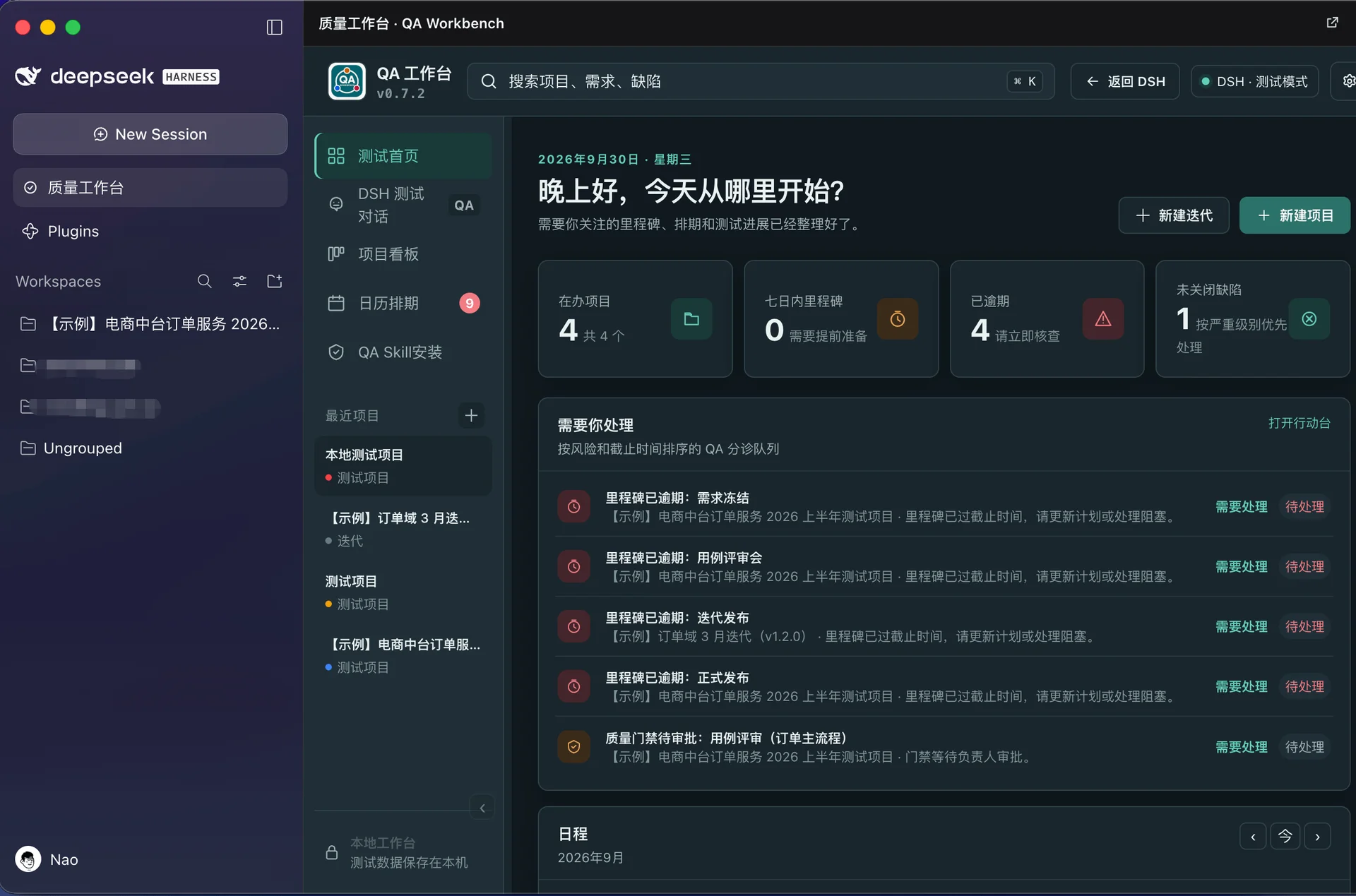
The boundary is:
| Desktop entry | Harness capabilities | Plugin | Workbench |
|---|---|---|---|
| DeepSeek Harness Desktop | Sessions; Models and Providers; Skills; Commands; Tools | dsh-qa | QA Workbench |
The desktop client supplies the Harness runtime and the Plugin entry point. dsh-qa supplies the QA and software-quality workflow.
Install dsh-qa from the official client
Install it in six steps:
- Open the official Harness client. Sign in to a DeepSeek account for official models, or configure the provider and API details for a custom model.
- Open Plugins.
- Choose Add Plugin.
- Enter dsh-qa GitHub repository:https://github.com/naodeng/dsh-qa.
- Confirm the installation.
- Open QA Workbench after the Plugin finishes installing.
For new users, this GUI entry point is easier to follow than starting with Harness CLI commands. It also makes the boundary visible: Harness owns the runtime and Plugin loading; dsh-qa owns the QA Workbench.
What dsh-qa provides
The desktop client does not change the role of dsh-qa. It remains a local QA Workbench for turning quality work into connected records and decisions.
Its current scope falls into three groups:
- Planning and assets: test project and iteration management, requirements, test cases, and test milestones.
- Execution and collaboration: defects, risks, QA Skills, AI-assisted testing, Native QA Execution, Action Desk, and test evidence.
- Analysis and delivery: test reports, QA Kanban, test calendar, failure analysis, regression analysis, quality gates, and release and delivery decisions.
The workflow can be summarized as:
| Requirements and planning | Execution and evidence | Analysis and decision |
|---|---|---|
| Requirement or source → Quality Task → Test Plan | Controlled Execution → Evidence → Failure Analysis | Regression → Quality Gate → PASS / WARN / BLOCK |
AI can assist with requirements analysis, test design, execution analysis, and evidence organization. A generated suggestion or a passing command does not remove the need for a human quality decision.
The important v0.7.2 fix: historical DSH conversations
The v0.7.2 fix restores historical DSH conversations. In some earlier cases, a project could lose access to older conversations after a Session rebind or the creation of a new Session.
Testing rarely ends in one conversation. A project may move through requirements analysis, test design, issue discussion, regression, and release review, and those steps can cross multiple Sessions. If an earlier conversation disappears after a rebind or a new Session, the project context gets cut off.
The release notes list fixes to historical conversation discovery, preservation, ordering, and rendering, including archived chats. Within the same Project Workspace, historical conversations should remain visible after rebinding the DSH Session or creating a new one.
Why conversation history matters in a QA Workbench
dsh-qa increasingly connects projects, tasks, DSH conversations, executions, evidence, and decisions.
If a conversation is only temporary chat, losing an old Session is inconvenient. Once it contains requirements analysis, test discussions, Skill execution, risk assessments, Agent tool calls, and quality conclusions, the history becomes part of the project context.
That context also helps explain how evidence was produced. The conversation is not automatically proof of product quality, but it can preserve the reasoning and decisions around the evidence.
Other v0.7.2 updates
The release also includes:
- Host Smoke support for dsh-v0.2.0-rc.2
- Updated installation and update documentation for the official macOS client
- Harness CLI installation commands that no longer pin a fixed version and instead use the current npm version
- Updated built-in version metadata
- Improved desktop Settings copy
- A fix for long project names being truncated in the Calendar Agenda
Together, they reduce friction around the official desktop environment and make the Plugin feel less like a separate path bolted onto Harness.
How the release was verified
The v0.7.2 release reports:
| Verification type | Count |
|---|---|
| Unit / API tests | 265 |
| Chromium E2E tests | 41 |
| Harness Host Smoke tests | 6 |
The release also records:
node --check public/app.js
npm pack --dry-run
git diff --check
The release reports 6 passing qa Host Smoke checks against dsh-v0.2.0-rc.2—a check against the real Harness Host.
These results cover the release paths listed above, not every operating system, model provider, Plugin, or production project.
Teams still need to validate their own workflows and environments.
Why start with the official client?
Before the official desktop client appeared, the community already had several useful third-party Harness desktop projects. Some provide a good user experience and helped move the ecosystem forward.
Now that an official client exists, I would start there for regular use and compatibility validation.
DeepSeek Harness can interact with more than a chat window:
| Local files | Model credentials | Sessions and extensions | Tool calls | Local execution |
|---|---|---|---|---|
| Project files | Model and Provider credentials | Sessions; Plugins and Skills | Tool invocation | Local commands and tasks |
Third-party clients still need individual assessment. The official client has a clearer relationship to the upstream project, its installer source, its update path, and the Harness Host it is expected to run.
I would still evaluate third-party clients individually:
| Source and maintenance | Distribution and updates | Permissions and credentials | Execution and compatibility |
|---|---|---|---|
| Is the source available? Is maintenance active? | Where are installers published? How do updates work? | Which permissions are required? How are credentials stored? | Are local commands executed? Which Harness versions are supported? |
For software that can reach local projects and execution environments, those questions deserve an answer before adoption.
One AI runtime, one QA Workbench
dsh-qa does not maintain a second AI runtime.
DeepSeek Harness continues to manage models, API keys, Providers, Sessions, Skills, Commands, and Tools.
Each test project binds to a native Harness Session and uses the corresponding QA mode.
The responsibility boundary is:
| DeepSeek Harness / AI runtime | dsh-qa / QA Workbench |
|---|---|
| Models; Sessions; Agents; Skills; Commands; Tools; Plugins | Requirements; Risks; Tests; Executions; Evidence; Defects; Reports; Quality Gates |
The desktop client keeps that architecture and makes the first step easier.
Local-first remains the foundation
The desktop entry does not change the local-first direction of dsh-qa.
Test projects, testing materials, and structured quality data remain local by default.
The combined model is:
| DeepSeek Harness | dsh-qa | Combined result |
|---|---|---|
| AI runtime | QA Workbench | AI-native QA workspace |
This lets teams use Harness models, Agents, Skills, and Tools without building a separate test-project system just to make AI useful.
From Web and CLI to Desktop
The recent evolution of dsh-qa has been:
| Stage | Capability |
|---|---|
| 1 | Standalone QA Workbench |
| 2 | DeepSeek Harness Plugin |
| 3 | Harness Session and QA preset |
| 4 | Quality Control Workbench |
| 5 | Native QA Execution |
| 6 | Action Desk |
| 7 | DeepSeek Harness Desktop entry |
Desktop is an easier entry point for the capabilities that already exist. It does not replace the quality workflow underneath.
The next part of the work still follows the same chain:
| Requirements and risks | Testing and execution | Evidence and decision |
|---|---|---|
| Requirement → Risk | Test → Execution | Evidence → Decision |
dsh-qa will continue tracking changes in the Harness Desktop, Host, and Plugin mechanisms and validating compatibility with future Harness versions.
The practical path
Download and install Harness from the official page, sign in or configure a custom model, add the dsh-qa Plugin, and open the QA Workbench.
If the client still displays the promotion, a new user who installs the client and signs in may receive ¥6 in credit, valid for one week. Check the terms shown in the client; this offer did not appear in the official public text I could crawl while preparing the article.
At the same time, dsh-qa v0.7.2 supports the latest Harness host target described here and restores historical DSH conversation discovery, ordering, preservation, and rendering.
For important projects, keep the existing Web or CLI workflow available while the desktop client remains in Preview.
Links
DeepSeek Harness
- DeepSeek Harness official product page:https://www.deepseek.com/harness/
- DeepSeek Harness repository:https://github.com/deepseek-ai/deepseek-harness
- DeepSeek Harness terms of use:https://www.deepseek.com/harness/terms-of-use/
DeepSeek Harness Desktop
- Desktop implementation documentation:https://github.com/deepseek-ai/deepseek-harness/blob/master/apps/desktop/README.md
dsh-qa
- dsh-qa GitHub repository:https://github.com/naodeng/dsh-qa
- dsh-qa v0.7.2 release notes:https://github.com/naodeng/dsh-qa/releases/tag/v0.7.2
- dsh-qa website:https://inaodeng.com/en/dsh-qa/