
Before release, the team needs a known scope, candidate build, checkable gates, test evidence, open-defect status, and an authorized decision owner. Release Testing Workflow organizes that information; specialist Skills prepare the artifacts for each gate.
This guide follows the release cadence and explains each Skill’s task, project inputs, and handoff. The release workflow gathers evidence and makes a recommendation at the decision point; the authorized owner approves the release.
Workflow at a glance
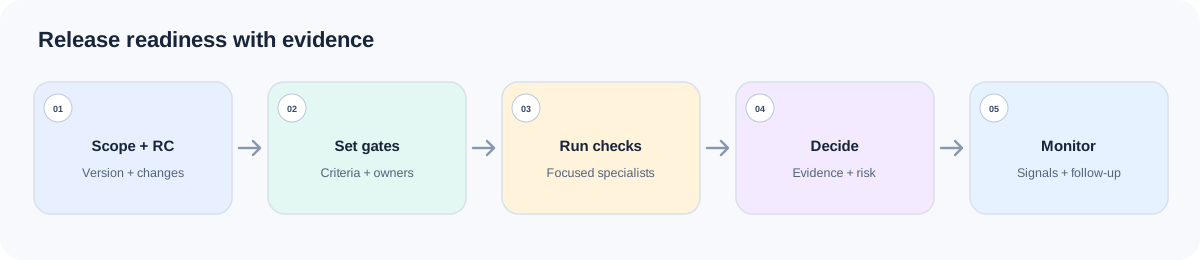
| Release milestone | Skill | Decision artifact |
|---|---|---|
| Establish the release window | Release Testing Workflow | Scope, T-window, gate board, evidence queue, next handoff |
| Make the test strategy executable | Test Strategy Plus | Per-area risk, depth, owner, entry/exit, gate, explicit deferrals |
| Prepare RC functional checks | Functional Testing | Prioritized core/negative/boundary scenarios and execution notes |
| Record an observed failure | Bug Reporting | Reproducible defect with impact, environment, and evidence |
| Summarize actual results | Test Reporting | Evidence-qualified quality status, blockers, residual risk, recommendation |
| Return to the release gate | Release Testing Workflow | Go/No-Go recommendation or pending authorized decision |
Choose specialist tests from the release scope and policy. When performance, security, accessibility, or compliance is in scope, install the relevant Skill and provide its report as a separate gate input.
Install the core Skills together
npx skills add naodeng/awesome-qa-skills --skill release-testing-workflow -g
npx skills add naodeng/awesome-qa-skills --skill test-strategy-plus -g
npx skills add naodeng/awesome-qa-skills --skill functional-testing -g
npx skills add naodeng/awesome-qa-skills --skill bug-reporting -g
npx skills add naodeng/awesome-qa-skills --skill test-reporting -g
For Chinese versions, use https://github.com/naodeng/awesome-qa-skills/tree/main/skills/zh as the source and keep each --skill name. These commands install at user scope (-g); remove -g for a project-local install, or add -a codex to target Codex. Install a specialist separately when the release scope requires it. Invocation depends on the agent: describe the task when it supports automatic discovery, or use its supported syntax to select a Skill. The @skill lines below are examples. Carry the same release scope and candidate-build identity through each handoff.
Prepare a release context pack containing release date and stakeholders, included/excluded changes, freeze rules, candidate version/build, known defects and previous release issues, rollback steps, required specialties, pre-production/production environments, monitoring access, and actual run records when available. Link the requirements, change list, design/API contracts, relevant test suites, and defect/incident records.
At release kickoff: set the timeline and draft gates
Release Testing Workflow — establish the timeline and draft gates
First identify the current release window and the gate to prepare. Provide the release date, scope, rollback plan, freeze rules, candidate status, known defects, required specialty areas, environments, owners, and monitoring constraints.
The paths below are examples. Replace them with the release scope, known-defect, rollback, and freeze-policy documents that actually exist in your project.
@skill release-testing-workflow
Prepare the readiness plan for release 4.18.2, planned for 2026-10-23.
Read releases/4.18.2-scope.md, releases/4.18.2-known-defects.md,
docs/release/rollback-4.18.md, docs/release/freeze-policy.md,
and the attached candidate build record.
Return the current T-window, explicit scope/exclusions, gate board, evidence
available and missing, owners or unknown owners, and the next Skill handoff.
No test run is attached yet, so do not make a Go/No-Go recommendation.
The output should state the release scope, current window, gates, evidence queue, defects, residual risks, and next handoff. T-14 and T-3 are relative examples. A short release window can combine calendar activities while keeping the gate criteria.
Before the candidate: turn risk into a testable plan
Test Strategy Plus — convert risk into checkable gates
Use Test Strategy Plus when you need a review-ready plan that combines sources, owners, milestones, and tradeoffs. Attach the release requirements, change analysis, technical constraints, team capacity, environment/data status, quality goals, known risks, and stakeholder expectations. A target date alone cannot supply the other inputs.
@skill test-strategy-plus
Build a decision-ready test strategy for release 4.18.2 using the attached
release scope, change list, checkout/refund rules, architecture notes,
known defects, team capacity, environment/data status, and required gates.
For each focus area, state Risk, Depth, Methods, Owner, Entry, Exit,
Out of scope, and Gate link. Make the gates checkable. Show what to focus,
sample, or defer and the resulting residual risk. Do not accept risks on behalf
of an authorized owner or invent capacity/environment facts.
The strategy should list scope and depth by area, owners, entry/exit criteria, gates, exclusions, deferrals, and checkable standards. Record delivery constraints, quality evidence, and authorized risk acceptance separately. The strategy feeds the release gate; it does not replace specialist test results.
Functional Testing — prepare candidate-build checks
Call Functional Testing for a bounded flow or changed product area. Include the exact RC build, release diff, approved business rules, target roles, environment, data/setup, current test assets, and known weak areas. Ask for scenarios and execution priorities; do not imply the Skill has run them.
The paths below are examples. Replace them with the business rules, release scope, and test directories that actually exist in your project.
@skill functional-testing
Prepare the high-priority functional checks for checkout and refund on RC
4.18.2-rc3. Read docs/product/checkout-and-refund-rules.md,
releases/4.18.2-scope.md, src/checkout/, src/refunds/, and tests/smoke/.
Group scenarios by user journey and release risk. Include the relevant normal,
negative, boundary, role/data, and integration paths. List execution setup,
open questions, and out-of-scope areas. Return a plan, not pass results.
The output should identify task scope, priorities, core functional coverage, key scenarios, execution notes, and open questions. The team or CI must run those checks and attach results tied to the same candidate build before a gate can count them as evidence.
During candidate testing: record observed failures
Bug Reporting — report defects found on the candidate
Only call Bug Reporting for a failure someone observed. Provide the candidate build, environment, account/state, preconditions, repro steps, actual and expected outcomes, frequency, impact, and evidence. Cite the approved rule or requirement that supports the expected outcome.
qa/repro/REL-221.md and qa/evidence/REL-221/ are example paths. Replace them with the defect record and evidence locations used by your project.
@skill bug-reporting
Report the refund failure observed on RC 4.18.2-rc3.
Repro steps and actual/expected are in qa/repro/REL-221.md.
Attach the screen recording and request log under qa/evidence/REL-221/.
State environment, preconditions, frequency, user impact, and evidence.
Separate observed facts from root-cause hypotheses and list missing information.
A defect report should include a concise summary, environment/preconditions, reproducible steps, actual versus expected, impact, and evidence/notes. Do not use a suspected cause as a confirmed technical conclusion.
Before the release gate: assemble evidence, then return to workflow
Test Reporting — build the evidence pack
After checks and retests, give Test Reporting the actual run export, build/environment, scope tested and not tested, defect list with status, coverage notes, blockers, waived/deferred work, and specialist reports that are in scope.
@skill test-reporting
Create the evidence pack for RC 4.18.2-rc3 from the attached test-run export,
defect list, retest records, and performance report. Summarize tested and
untested scope, blockers, critical defects, confidence, residual risk,
release recommendation, and next actions. Cite the evidence for each status.
If run or defect evidence is absent, state quality_status as
not executed or insufficient evidence.
The report should distinguish confirmed facts, inferences, missing evidence, residual risk, and recommendations. Without run records or other execution evidence, mark the status “not executed or insufficient evidence.” A deployed environment, planned tests, or empty defect list does not prove a pass.
Release Testing Workflow — make the gate recommendation
Return to Release Testing Workflow with the evidence pack, specialist reports, open defects, rollback/monitoring readiness, residual risks, and any authorized risk acceptance. Ask for a Go, No-Go, or conditional recommendation only when the release is at that decision point.
@skill release-testing-workflow
Assess the Go/No-Go gate for release 4.18.2-rc3 using the attached evidence
pack, open-defect list, rollback readiness, monitoring checklist, and approved
risk acceptances. Separate passed evidence, failures, blockers, and unknowns.
If a condition or approval record is missing, keep the decision pending and
name the authorized owner and evidence needed. This is a recommendation only.
The Skill may recommend a release position, but formal approval requires the authorized decision owner, version/scope, decision time, and evidence source. Without that record, keep approval pending. A conditional Go must have verifiable conditions, an accepting owner, and a defined consequence if a condition fails.
Best practices
Shorten the timeline, not the gates
A hotfix can shorten the schedule, but impact assessment, required checks, rollback, monitoring, and decision ownership still need evidence.
Name the candidate build every time
Tie run records, defects, specialist reports, and the release decision to the exact build and scope.
Separate test evidence from risk acceptance
A schedule constraint can change test depth; it cannot turn a failed test into a pass or accept risk without an authorized owner.
Keep specialist work focused
Each specialist Skill should produce one focused artifact. The release workflow combines those reports at the gate.
FAQ
Do I have to follow the sample T-14 schedule?
No. T-14 is a relative example. Use the actual release date and merge activities if needed, but keep the gate criteria.
Can a Skill approve the release?
No. A Skill can prepare a recommendation. The authorized decision owner must approve and record the version, scope, time, and evidence.
What if a required performance or security report is missing?
Keep that specialty gate open or blocked. Do not treat a planned test or a report from another build as a pass. Install and invoke the relevant specialty Skill if that work is in scope.
Can Test Reporting say “ready” when test evidence is missing?
No. It should mark the quality status as not executed or insufficient evidence and explain what evidence is still needed.
References
- Awesome QA Skills:https://github.com/naodeng/awesome-qa-skills
- Release Testing Workflow:https://github.com/naodeng/awesome-qa-skills/tree/main/skills/en/testing-workflows/release-testing-workflow
- Test Strategy Plus:https://github.com/naodeng/awesome-qa-skills/tree/main/skills/en/testing-types/test-strategy-plus
- Functional Testing:https://github.com/naodeng/awesome-qa-skills/tree/main/skills/en/testing-types/functional-testing
- Bug Reporting:https://github.com/naodeng/awesome-qa-skills/tree/main/skills/en/testing-types/bug-reporting
- Test Reporting:https://github.com/naodeng/awesome-qa-skills/tree/main/skills/en/testing-types/test-reporting