
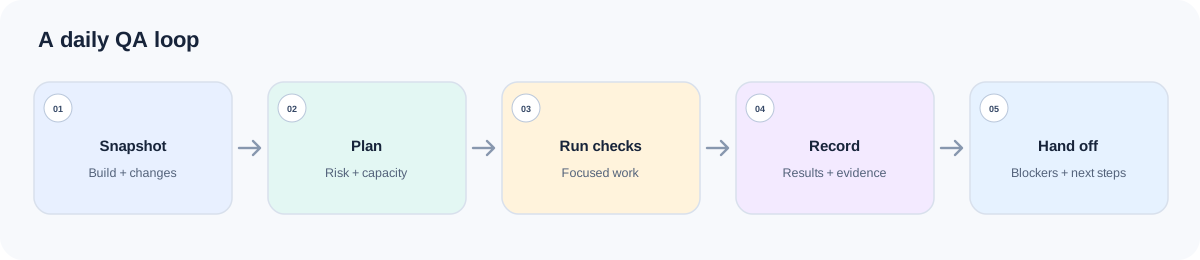
The daily QA plan can change before lunch: a candidate build slips, staging is unavailable, or a fixed defect needs a retest. Any of those can disrupt the work planned for the day. Daily Testing Workflow helps reset priorities; specialist Skills prepare focused checks, document observed defects, and summarize the handoff.
This four-Skill loop separates planning, test design, defect reporting, and end-of-day status. A plan never stands in for an executed test.
Workflow at a glance
| Daily stage | Skill | What it contributes |
|---|---|---|
| Start of day | Daily Testing Workflow | Scope, risk-ordered queue, readiness gate, and one next handoff |
| Prepare a focus area | Functional Testing | Prioritized functional scenarios and execution notes |
| After a real failure | Bug Reporting | Reproduction details, impact, and evidence in a developer-ready report |
| End-of-day handoff | Test Reporting | Evidence-backed status, blockers, residual risk, and next actions |
Daily Testing Workflow identifies the current stage and the next handoff. A tester or runner still performs the checks and records the results; specialist Skills handle test cases and reports.
Install the Skills together
npx skills add naodeng/awesome-qa-skills --skill daily-testing-workflow -g
npx skills add naodeng/awesome-qa-skills --skill functional-testing -g
npx skills add naodeng/awesome-qa-skills --skill bug-reporting -g
npx skills add naodeng/awesome-qa-skills --skill test-reporting -g
For Chinese versions, use https://github.com/naodeng/awesome-qa-skills/tree/main/skills/zh as the source and keep each --skill name. These commands install at user scope (-g); remove -g for a project-local install, or add -a codex to target Codex. Invocation depends on the agent: describe the task when it supports automatic discovery, or use its supported syntax to select a Skill. The @skill lines below are examples. If a newly installed Skill does not appear, reload the session and check that agent’s installation instructions.
Before calling the workflow Skill, prepare today’s project snapshot: build/commit ID, target environment, stories and acceptance criteria, changed files, test data/accounts, known P0/P1 issues, yesterday’s carryover, team capacity, and freeze time. Reference only the documents that affect today’s decisions.
Before testing: set today’s scope and readiness
Daily Testing Workflow — set today’s scope and gates
Use this Skill at the start of the workday, or when priorities change materially. It needs today’s goal, stories/bugs/regression scope, proximity to release, build and environment status, known severe defects, carryover, capacity, and any time or data constraints.
Example document paths (replace them with the corresponding documents that exist in your project): releases/4.18.2-scope.md (release scope), qa/known-issues.md (known issues), and docs/runbooks/staging-test-data.md (test-data runbook).
@skill daily-testing-workflow
Plan QA for build 4.18.2-rc3 today. We have one tester for four hours.
Read releases/4.18.2-scope.md, qa/known-issues.md,
docs/runbooks/staging-test-data.md, and yesterday's handoff.
Today's focus is checkout and refund; mark lower-priority work we may defer.
First verify whether the build and staging environment are ready for execution.
Return today's scope, P0-P2 queue, gate status, blockers, and exactly one
next Skill handoff with the context that Skill needs. Do not claim any tests ran.
It should state today’s scope, priorities, gate status, risks, and next handoff. If the environment is unusable or the current build has no smoke result, execution readiness stays RED. Assigning an owner to restore the environment does not clear the gate; offline planning can continue while execution remains blocked.
As work changes: prepare focused feature checks
Functional Testing — design checks for one feature
When today’s focus is a functional change, call this Skill for a bounded feature or flow. Provide the requirement/story, UI or API behavior, target users and roles, current build, environment, data constraints, known defects, and existing test assets.
Example document paths (replace them with the corresponding documents that exist in your project): docs/requirements/refund-flow.md (requirements) and docs/product/refund-policy.md (refund rules).
@skill functional-testing
Prepare functional coverage for the refund flow changed in PR 842.
Read docs/requirements/refund-flow.md, docs/product/refund-policy.md,
services/refund/, and tests/refund/. The target is staging build 4.18.2-rc3.
Prioritize the core refund journey, then include relevant negative, boundary,
role, data-state, and integration cases. Return scenarios and execution notes;
separate open questions from confirmed behavior. Do not report results.
The output is a test design or plan. The team still needs to run the cases and capture run IDs, results, and environment before reporting execution status.
When a check fails: capture what actually happened
Bug Reporting — describe an observed failure
Call Bug Reporting only after observing a failure. Provide the app/build, browser/device, account type, preconditions, exact steps, actual and expected behavior, reproduction frequency, impact, and screenshot/video/log evidence. If the expected behavior is uncertain, include its rule source or mark it as an open question.
Example document: qa/repro/BUG-1842.md is a sample defect reproduction record. Replace it with your project’s actual record and attach the related evidence.
@skill bug-reporting
Format the checkout failure from staging build 4.18.2-rc3.
Precondition: a standard member has an active 10% coupon.
Steps and observed/expected behavior are in qa/repro/BUG-1842.md.
Attach the browser console log and screenshot in qa/evidence/BUG-1842/.
Keep observed facts separate from root-cause guesses; assess user impact and
list any missing evidence or questions needed to reproduce the issue.
The report should capture environment and preconditions, reproduction steps, actual versus expected behavior, impact, evidence, and open details. Do not invent a root cause or turn a vague observation into a confirmed defect.
At handoff: close the day with evidence
Test Reporting — close the day with evidence
Use Test Reporting after checks finish or become blocked. Attach the real execution results, defect list, coverage notes, scope, environment, deferred checks, and blockers. Partial evidence requires qualified conclusions.
@skill test-reporting
Prepare today's QA handoff for build 4.18.2-rc3 from the attached run export,
defect list, and environment notes. Summarize tested and untested scope,
critical defects, blockers, confidence, residual risk, and tomorrow's top actions.
Every status must cite its run or source. If execution or defect evidence is
missing, state that quality status is not executed or insufficient evidence.
The report should cover scope, progress, risks, blockers, defects, next actions, and evidence strength. A planned case count is not an executed count; without run evidence, do not claim a pass.
Best practices
Choose one primary handoff at a time
Do not ask the daily workflow to expand into a complete functional test plan, defect report, and executive report in one response.
Keep the readiness gate honest
A red environment blocks execution even if a recovery owner has been assigned.
Carry the build identity through every stage
Cases, defects, and reports should identify the same build and environment when they concern the same run.
Separate the plan from what happened
Use planned, not run, blocked, failed, and passed only when the evidence supports that state.
FAQ
What if the environment is down?
Ask Daily Testing Workflow to keep the start gate RED, assign/escalate recovery, and replan work that can be done offline. Do not describe execution as started.
Can Test Reporting still produce a report when run results are missing?
Yes. It should explain the evidence gap and report “not executed or insufficient evidence,” rather than inventing a pass rate or zero defects.
Does Functional Testing run my automated suite?
The Skill provides functional coverage and execution notes. A test runner or tester must run the suite and provide results unless your agent has a separate, explicitly configured execution tool.
References
- Awesome QA Skills:https://github.com/naodeng/awesome-qa-skills
- Daily Testing Workflow:https://github.com/naodeng/awesome-qa-skills/tree/main/skills/en/testing-workflows/daily-testing-workflow
- Functional Testing:https://github.com/naodeng/awesome-qa-skills/tree/main/skills/en/testing-types/functional-testing
- Bug Reporting:https://github.com/naodeng/awesome-qa-skills/tree/main/skills/en/testing-types/bug-reporting
- Test Reporting:https://github.com/naodeng/awesome-qa-skills/tree/main/skills/en/testing-types/test-reporting