
Exploratory testing needs a clear mission, product context, and a time box. That gives the tester a risk focus while leaving room to follow new evidence when the application behaves unexpectedly.
Use Skills to prepare the session and make its results easier to share. The Skills do not perform the human exploration: the tester runs the session, records what happened, and passes real evidence to the next step.
Workflow at a glance
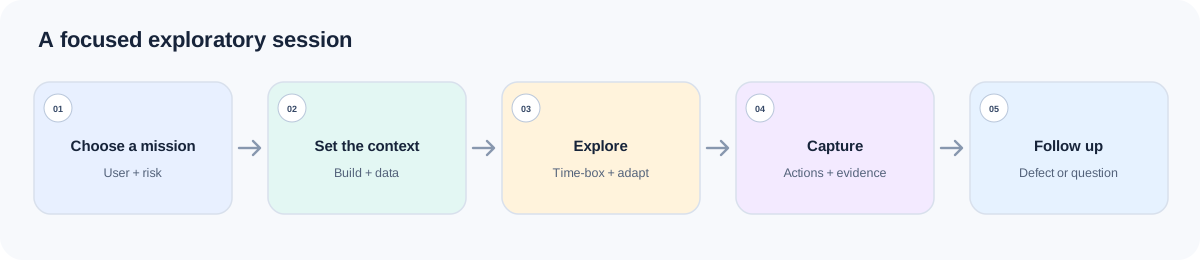
| Session moment | Skill | Output to carry forward |
|---|---|---|
| Select a risky area | Quality Risk Analysis | Evidence-linked risk, impact, priority, and open questions |
| Prepare the charter | Manual Testing | Time-box, setup, checklist, exploratory focus, and evidence plan |
| Run the session | Tester | Build, setup, actions, observations, screenshots/logs, and state |
| Describe a confirmed failure | Bug Reporting | Reproducible defect report with impact and evidence |
| Close and share learning | Test Reporting | What was covered, what was not, findings, confidence, and follow-up |
Each Skill has a defined role: risk analysis selects what to investigate; Manual Testing prepares the charter; Bug Reporting describes an observed failure; and Test Reporting summarizes only the coverage the evidence supports.
Install the Skills together
npx skills add naodeng/awesome-qa-skills --skill quality-risk-analysis -g
npx skills add naodeng/awesome-qa-skills --skill manual-testing -g
npx skills add naodeng/awesome-qa-skills --skill bug-reporting -g
npx skills add naodeng/awesome-qa-skills --skill test-reporting -g
For Chinese versions, use https://github.com/naodeng/awesome-qa-skills/tree/main/skills/zh as the source and keep each --skill name. These commands install at user scope (-g); remove -g for a project-local install, or add -a codex to target Codex. Invocation depends on the agent: describe the task when it supports automatic discovery, or use its supported syntax to select a Skill. The @skill lines below are examples. If a newly installed Skill does not appear, reload the session and check that agent’s installation instructions. Before you start, collect the feature scope and user roles, business rules, UI/API design or screenshots, recent code changes, build and environment, test accounts and data, known issues, and the session time limit.
Before the session: choose a risk and write the charter
Quality Risk Analysis — decide where to spend the session
Use this Skill when you need to select a high-value area before testing, or when multiple candidate risks compete for limited session time. Supply business goals, change scope, architecture/dependencies, users and data, defect history, release constraints, current version/environment, prior results, and any time or prohibited-action limits.
Example document paths (replace them with the corresponding documents that exist in your project): product/saved-payment-rules.md (business rules), design/payment-settings.md (design), and qa/known-payment-issues.md (known issues).
@skill quality-risk-analysis
Prioritize risks for the new saved-payment flow on staging build 4.18.2-rc3.
Read product/saved-payment-rules.md, design/payment-settings.md,
src/payments/savedMethods/, qa/known-payment-issues.md, and the attached
last-release defect export. We have 45 minutes, one standard-member account,
and no permission to delete production-like data.
Separate evidence from hypotheses. Rank the main failure modes by business
impact, likelihood, and detectability; state uncertainty and provide concrete
checks, evidence to capture, and open questions. Do not claim the flow was tested.
The Skill uses the supplied information to rank risks, suggest scenarios or checks, and identify blockers, residual risk, and next actions. It should explain important conclusions. If the project has no scoring scale, ask for a qualitative ranking instead of inventing precise scores. Risk analysis is a design artifact, not test evidence.
Manual Testing — prepare a focused charter
Choose the highest-value risk from the analysis and call Manual Testing to turn it into a session a tester can run. Include mission, build/environment, account and data, time box, scope, known defects, evidence requirements, and any data-cleanup or access policy.
Example document paths (replace them with the corresponding documents that exist in your project): qa/risk/saved-payment.md (confirmed risks) and docs/qa/staging-access.md (test-environment access instructions).
@skill manual-testing
Create a 45-minute session charter for the saved-payment risks confirmed in
qa/risk/saved-payment.md. Test staging build 4.18.2-rc3 using the standard-member
account described in docs/qa/staging-access.md.
Cover changing and removing a saved card, including relevant error and data-state
paths. Return priorities, a session checklist, exploratory focus areas, evidence
fields, stop/escalation conditions, and open questions. Do not report execution.
The charter should be runnable: state the task and risk, build and environment, test data, time box, exploration scope, evidence to capture, and open questions.
During the session: explore and keep evidence
During execution, record the starting state, action, any defined expectation, actual observation, evidence ID, and state. If expected behavior is unclear, note the rule that needs confirmation instead of inventing an oracle. Mark work that has not started NOT_RUN, interrupted work INCOMPLETE, and environment-blocked work BLOCKED. A checklist is not a run log.
When exploration finds a failure: make it reproducible
Bug Reporting — turn an observation into a reproducible report
After the tester observes a failure, call Bug Reporting with the exact app version, browser/device, account, preconditions, steps, actual and expected behavior, frequency, impact, and screenshot/video/log. Include the rule or design source for the expected behavior.
Example document: qa/sessions/EX-209.md is a sample session record. Replace it with the actual record for your session and attach its screenshots and network log.
@skill bug-reporting
Write a report for the saved-card failure observed during session EX-209.
The run record is qa/sessions/EX-209.md; attach screenshot EX-209-04.png
and network log EX-209.har. State environment, account state, repro steps,
actual versus expected, frequency, user impact, and evidence. Separate the
observed failure from any root-cause hypothesis; list missing details.
The report should let another person reproduce the issue and assess its impact. If it cannot be reproduced yet, record an observation for follow-up; do not call it a confirmed defect or invent a cause.
At the time-box boundary: debrief what was learned
Test Reporting — capture what the session did and did not learn
At the end of the session, give Test Reporting the charter, actual session notes, evidence links, defects, build/environment, areas explored and skipped, and remaining questions. The Skill should summarize only the evidence-supported scope.
@skill test-reporting
Summarize exploratory session EX-209 from the charter, session record,
attached screenshots, and defect list. State areas explored and not explored,
observations versus confirmed defects, blockers, residual risks, confidence,
and follow-up actions. Trace conclusions to evidence. If execution or defect
evidence is missing, state quality_status as not executed or insufficient evidence.
The report should cover tested and untested areas, risks, blockers, defects, next actions, and evidence strength. A session supports only the conclusions its evidence covers, not a broad release-quality claim.
Best practices
Keep the charter small enough to run
A 45-minute session should focus on a few priority questions and leave time to follow new evidence.
Protect state and data
Use recoverable test accounts and checkpoints; follow project policy when resetting orders, cards, or configuration.
Separate scripted and exploratory work
Mark which checks followed an existing case and which were exploratory observations.
Capture evidence as you go
Record build, environment, starting state, action, observation, and evidence ID while the session is fresh.
FAQ
Does Manual Testing explore the application for me?
No. It prepares a plan or checklist from the supplied materials. A human tester or an explicitly configured browser agent must interact with the application and record execution evidence.
What if there is no clear expected behavior?
Keep the observation, cite the missing rule, and ask the owner to clarify the oracle. Do not report the guessed behavior as a product defect.
Can I change the charter mid-session?
Yes. Follow new evidence when useful, but record why the focus changed, what was left incomplete, and where to resume.
Does a 45-minute session prove the feature is safe?
No. The report covers only the risks and paths actually explored, with confidence qualified by that limited scope.
References
- Awesome QA Skills:https://github.com/naodeng/awesome-qa-skills
- Quality Risk Analysis:https://github.com/naodeng/awesome-qa-skills/tree/main/skills/en/testing-types/quality-risk-analysis
- Manual Testing:https://github.com/naodeng/awesome-qa-skills/tree/main/skills/en/testing-types/manual-testing
- Bug Reporting:https://github.com/naodeng/awesome-qa-skills/tree/main/skills/en/testing-types/bug-reporting
- Test Reporting:https://github.com/naodeng/awesome-qa-skills/tree/main/skills/en/testing-types/test-reporting