
An individual Prompt can help analyze a requirement. For a team to reuse the method, the team also needs clear usage conditions, steps, outputs, and an owner. Copying the Prompt into a shared document leaves those questions open.
Review recent tasks and failures to find the checks that recur and have proved useful before writing a Skill.
Move from one success to repeatable work
Start by saving a few requirement analyses, including input versions, confirmed rules, AI output, human edits, and issues found. After several runs, identify the steps that recur and the details that apply only to one project.
Good first candidates are tasks that recur, have defined inputs, and produce results the team can review, such as acceptance-criteria or test-case review. Exploratory testing and discussions with an unclear business goal need room to adapt; keep those workflows flexible.
| Stage | Question | Reusable asset |
|---|---|---|
| Individual use | Does this task actually benefit? | Original requirement, conversation, and human edits |
| Stable Prompt | Which instructions work repeatedly? | Template, input fields, and output conventions |
| Skill packaging | Which steps must be followed each time? | Skill instructions, references, templates, or scripts |
| Team pilot | Can different people use it effectively? | Usage guide, evaluation samples, feedback, and version records |
Start with a recent successful task
Choose a small, recurring task with reviewable results, such as finding gaps in a requirement. Do not rush to write a Skill. Work through these steps first:
- Collect three to five redacted examples, keeping the requirement version, original Prompt, AI output, human edits, and final findings.
- Mark the checks that recur across examples, then separate details that belong only to one project or requirement version.
- Turn the stable steps into a Prompt template with clear inputs, outputs, and rules for missing information.
- Try complete, missing-field, and conflicting-source samples. Record omissions, mistakes, and human additions.
- Package the steps as a Skill only when they recur and can be reviewed consistently; assign an owner and version.
- Ask a colleague to use the same samples independently and check whether the handoff is understandable, traceable, and usable.
If tasks differ substantially from run to run, keep the Prompt flexible or retain human review.
Make the Skill understandable
A team Skill for requirement-gap analysis should state when to use it and what inputs it needs. It can ask AI to extract rules, mark gaps and conflicts, cite evidence, and identify risks. Unconfirmed behavior should become a question for the business owner. The instructions should also define output fields, human-review points, and what to do when information is missing.
Document the Skill’s name, owner, and maintenance version as well. Whether it needs a script depends on the task. If clear instructions and a reference template are enough, extra files add little value.
Name who updates references, confirms business rules, and reviews Skill changes. If the Skill includes scripts, file writes, or external access, define the authorized scope and prohibited actions. Limit permissions to what the task requires.
For “requirement-gap review,” an individual Prompt can first become an evaluation sample, then an input-and-output agreement for a Skill:
| Item | Example agreement |
|---|---|
| Input | Versioned requirement, scope, existing acceptance criteria, and relevant API contract |
| Steps | Extract rules and cite each source; mark missing, conflicting, and outdated information separately |
| Output | Rule ID, source location, risk impact, open question, and smallest action to get evidence |
| Boundary | Do not make up business rules for Product; keep unsupported expectations open |
| Regression samples | Three redacted inputs: complete requirements, a missing key field, and conflicting sources |
This table shows a possible structure, not measured evaluation results. During the pilot, keep input versions, output, human edits, and review conclusions. If the model turns missing information into a fact, retain that sample as a failure case, revise the instructions, and rerun it.
Worked example: turn a requirement-gap Prompt into a Skill
First make the one-off request reusable by stating the review steps and output contract. This is a starting point you can adapt:
Task: Review the supplied requirement version and identify missing, conflicting, or outdated information that affects test design.

Input: Requirement version and scope, acceptance criteria, and relevant interface or design constraints. Use only the supplied material.

Steps:
1. Extract verifiable rules and record a source location for each.
2. Mark rules as confirmed, missing, conflicting, or stale.
3. Check success, failure, boundary, state-change, and side-effect paths; cite the basis for each risk.
4. Turn behavior that cannot be confirmed from the material into a question and the smallest evidence request. Do not decide the answer for Product.

Output: Rule ID, source, evidence state, risk, open question, and evidence action.
Boundary: Separate fact, inference, and recommendation. Never present a missing rule as confirmed.
Next separate reusable practice from project material:
| Stable part extracted from the Prompt | Where it belongs in a Skill | What stays in each task input |
|---|---|---|
| Check input version and scope first | Use conditions and required inputs | Current project, requirement version, and business scope |
| Extract each rule and cite its source | Repeatable workflow steps | Project acceptance criteria and interface constraints |
| Distinguish missing, conflicting, and stale information | Evidence-handling rules | Specific conflicts in the current materials |
| Report risks and questions in fixed fields | Output format | Project owner, priority, and decision |
| Do not guess; ask when evidence is missing | Boundaries and human-review points | Who will confirm this task’s open questions |
Then put the stable parts in a readable Skill file. This is a content example; adapt its name and metadata to the target host’s Skill format:
# Requirement Gap Review

## Use when
Reviewing a versioned requirement for missing, conflicting, or outdated test-relevant behavior.

## Required input
- Requirement version and scope
- Acceptance criteria
- Relevant interface or design constraints

## Workflow
1. Extract each verifiable rule and cite its source location.
2. Mark each rule as confirmed, missing, conflicting, or stale.
3. Review success, failure, boundary, state-change, and side-effect paths.
4. Turn unresolved behavior into a question and a minimum evidence request.

## Output
Rule ID, source, evidence state, risk, open question, and evidence action.

## Boundaries
Separate fact, inference, and recommendation. Do not invent business rules or make the human decision.
Do not hard-code a requirement version, customer data, owner, or business decision into the Skill; those change and belong in runtime input. Keep tokens, real personal data, and permissions beyond the task out of examples too.
Evaluate failure samples too
Prepare three to five redacted samples covering complete rules, missing information, conflicting rules, and difficult boundaries. Check whether important questions are found, unknowns are kept open, the output follows the agreement, and human edits decrease. Add failure samples to the regression set and rerun them after each Prompt or Skill change.
Evaluating complete, missing, conflicting, and boundary samples shows where the Skill omits information or guesses. If the sample set is too small, mark the result “not yet validated” rather than claim the team is more efficient.
Run a small pilot over four weeks
| Week | Focus | Deliverable |
|---|---|---|
| 1 | Choose a frequent task and collect redacted requirements and failure samples | Sample set and known-issues list |
| 2 | Stabilize the Prompt, required inputs, and output format | Reviewable template |
| 3 | Package the Skill for the target platform and run regression checks | Initial Skill and evaluation record |
| 4 | Invite a small group to try it, collect issues, and decide whether to expand | Usage guide, improvement list, and rollout decision |
Four weeks is a pilot schedule teams can adjust to their readiness. Pause the rollout if samples are insufficient, outputs are unstable, or no one owns maintenance.
Focus: Put Skill maintenance into a quality loop
The team needs trustworthy inputs, suitable steps, traceable outputs, and a way to correct failures. A Skill can reduce repeated explanations, while people remain responsible for confirming requirements, judging risk, and making release decisions.
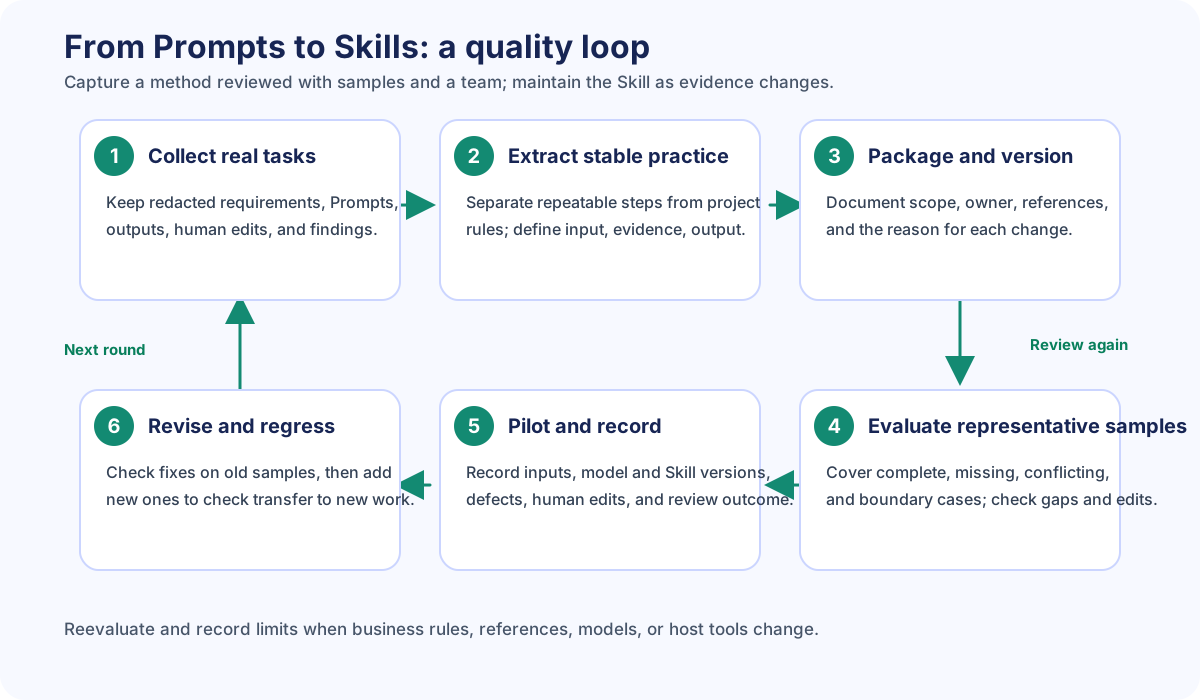
- Choose a real recurring task: start from work and failures that already happened, not from an imagined workflow.
- Extract stable judgments: capture repeatable checks, input needs, evidence rules, and output fields; keep project-specific facts in task context.
- Package and version: before sharing, record the owner, scope, dependencies, and reason for each change.
- Evaluate representative samples: use complete, missing, conflicting, and boundary cases to check omissions, guesses, traceability, and human edits.
- Pilot and record: preserve input version, model/Agent, Skill version, output, defects, human edits, and review conclusions.
- Revise and rerun: add confirmed fixes to the regression set. Recheck known issues on the same samples and use new samples to check transfer.
Reassess when the business process, references, model, or host tool changes. If there is no stable sample set or maintenance owner, keep the status as “not yet validated.” Update the method when evidence changes, and record which inputs and versions have been evaluated.
Best practices
- Collect several real examples before deciding which steps to codify; one successful run does not establish a stable method.
- Separate reusable review steps from project facts so the Skill does not overfit one requirement.
- Include evidence sources, unknown states, output fields, and human-review points—not just a vague instruction to “check everything.”
- Regress on failure and boundary samples, and record before-and-after differences; do not rely only on success screenshots or adoption counts.
- Assign an owner, version, and reevaluation triggers. Reassess when the business, model, tools, or references change.
- Request only the file and tool access needed for the task, and redact examples and evaluation samples.
FAQ
When is a Prompt worth turning into a Skill?
Consider a pilot when the task recurs, its inputs and outputs can be described, the team needs consistent steps, and results can be reviewed. Keep a flexible Prompt if the task varies widely or its rules are still being discussed.
What is the core difference between a Skill and a Prompt?
A Prompt is often a one-time instruction or reusable template. A Skill also describes when to use it, required inputs, workflow, output contract, boundaries, and maintenance. Exact capabilities depend on the host platform; the label alone does not guarantee them.
Does a Skill need scripts or multiple files?
No. Start with the smallest readable instructions that do the job. Add references, templates, or scripts only when they solve a clear problem, and document their version, source, and permissions.
Can I carry the result over after changing models?
Do not carry it over without checking. Rerun fixed regression samples, record the model, tool, and Skill versions, and review omissions, unsupported claims, and human edits. The conclusion covers only conditions actually evaluated.
How do I know the Skill improved quality?
Compare critical gaps found, unsupported claims, traceability, and human revision cost on the same samples, and retain review records. Without runs and evidence, say “not yet validated” instead of claiming improvement.
Use the task and evaluation evidence to decide whether a more complex Agent is worth adding. Higher automation alone is not a reason to adopt one.