
Once a test case has been reviewed, asking AI to write automation sounds straightforward. But code that runs is not necessarily an effective test. It may call the wrong endpoint, use unstable data, or check a response field that says little about the behavior that matters.
A safer approach is to start from one clear test condition, generate the smallest implementation, then have a person review it and run, inspect, and revise it in an authorized isolated test environment.
Getting started: automate one reviewed case
Move from a manual case to automation in this order:
- Choose one specific scenario. Start with a case that runs often, has a clear risk, and has a sourced expected result. Do not begin with “automate the whole module.”
- Provide project context. Tell AI the language, framework, directory, existing fixtures and helpers, UI or API contract, data setup and cleanup, and environments it must not access.
- Request the smallest code change. Ask AI to explain the proposed files and assertions, then generate a test for this single scenario. Mark missing response codes, copy, selectors, or state hooks as needing confirmation.
- Review the code yourself. Check locators, business assertions, test-data isolation, cleanup, and scope. Do not run code you cannot explain.
- Run it in an authorized isolated environment. Save the command, result, logs, and environment details. Distinguish not run, skipped, failed, and passed.
- Use evidence to choose the next step. Classify failures first. Add stable tests with useful diagnostic power to the regression set.
Flow at a glance: reviewed case → project context → small AI draft → human review → isolated run → evidence review.
Explain the project boundaries first
Before asking AI to write code, provide the language and test framework, test-directory conventions, existing helpers, API contract, authentication method, test environment, data setup and cleanup, and external systems the test must not access. For a UI test, include the page path, accessible names, state, and waiting conventions.
Even with a test case, AI can guess how the project organizes tests. Do not paste production secrets, real user data, or unredacted logs. When credentials are required, use the environment-variable or secrets-management approach already adopted by the project.
API tests: do not stop at “the request succeeded”
To verify that an incorrect code does not create an account, define the test phone number, how to ensure the code is invalid, the response specified by the API contract, how to check that no account was created, and how to clean up afterward. This pseudocode only expresses the intent; replace the endpoint, status, and query with the project’s actual contract:
response = submit_verification(test_phone, invalid_code) assert response.status == expected_rejection_status assert account_for(test_phone) is None
Checking only an HTTP status does not prove that the business side effect is correct. On the other hand, if test data is reused by other runs, a concurrent test could affect whether an account exists. Use unique data, an isolated environment, or a clear cleanup strategy.
For the exercise rule R-03, “Five consecutive incorrect attempts trigger a 15-minute lockout,” the test needs to connect the threshold, state, and data setup:
| Step | What the automation should do | What the project must define |
|---|---|---|
| Setup | Use a resettable synthetic phone number and ensure each run starts without a previous failure count | Test-data creation/reset interface and isolation method |
| Failures 1–4 | Submit four consecutive invalid codes and check the state against the contract. If testing the fourth attempt alone, submit all four from the initial state. | Response contract and observable state for these attempts |
| Fifth failure | Continue the same sequence with one more invalid code. If testing it alone, submit five consecutive invalid codes from the initial state; check whether lockout begins as R-03 specifies. | How to query and record lockout state |
| During lockout | Submit another request, check the contract-defined behavior, and confirm there are no unintended account or session side effects | Lockout response and side-effect rules |
| Teardown | Save the case ID, synthetic-data identifier, and report, then clean up or reset the state | Cleanup owner and recovery method after failure |
If the project has no controlled counter reset or state-observation method, record that as a testability gap. Do not ask AI to invent a test endpoint or guess how the 15-minute boundary is handled.
UI tests: prefer stable user-facing semantics
In a project that supports Playwright, locate controls by labels and button names before using DOM hierarchy selectors that may change easily. This snippet shows the shape of a test only; confirm the actual labels and error copy against the product:
page.get_by_label(“Phone number”).fill(test_phone) page.get_by_label(“Verification code”).fill(invalid_code) page.get_by_role(“button”, name=“Log in”).click() expect(page.get_by_text(“Incorrect verification code”)).to_be_visible()
If the interface does not expose these accessible names, do not ask AI to invent a selector. Review the page implementation, requirement, and test accessibility. Avoid fixed sleeps in place of condition-based waits; wait for the expected state or return a clear timeout failure.
Classify failures before changing anything
When a test fails, do not immediately ask AI to make it green. Keep the failure log and environment details, then determine whether the cause is incorrect test code, product behavior, contaminated test data, an environment fault, or intermittent instability. Only then decide whether to change the test, fix the product, or repair the environment.
Passing tests need review too. Do assertions cover the target behavior? Was the test skipped? Would it fail if the feature were deliberately broken? Add it to the continuous integration pipeline only after it runs consistently and produces traceable evidence.
For a new behavior that has not been implemented yet, you can use small Test-Driven Development (TDD) steps: confirm the behavior and expected result, write and run a minimal test, and confirm that it fails because the behavior is not implemented. Then implement or adjust the code and make the test pass. Finally, in a controlled environment, deliberately break the behavior and verify that the test fails. If the behavior already exists, do not force an initial failure just to apply TDD; add a regression test and use a controlled mutation to check whether its assertion can distinguish correct from incorrect behavior.
Keep reviewable execution records
Keep code review and execution evidence together whenever AI generates or changes a test. The fields below are a recording template; they do not claim that any project has been run.
| Field | What to record | What to keep in mind |
|---|---|---|
| Source case | Requirement ID, test-case ID, expected behavior, and version | Mark an assertion as needing confirmation if it has no source |
| Code scope | Changed files, test framework, reused fixtures or helpers | Explain changes unrelated to the requirement separately |
| Data and environment | Synthetic-data identifier, environment, external dependency boundary, cleanup result | Shared data or real credentials make results harder to reproduce and increase risk |
| Execution | Full command, time, exit status, and raw report location | Not run, skipped, and passed are different states |
| Assertion strength | Would the test fail if the target behavior broke, and what evidence supports the answer? | One pass does not prove an assertion is effective |
Treat the run as regression evidence only when requirement source, test code, data isolation, and execution report line up. If an environment problem prevents the test from reaching its assertion, record it as unevaluated—not as a product pass or failure.
Ask AI to do one small step at a time
First, ask AI to inspect the existing test directories and framework conventions. Then request the smallest code change for one reviewed test case. Starting with “automate the whole login module” makes the code scope, test data, and acceptance target difficult to review.
For example:
Add one automated test for the reviewed case below using the current test framework.
Requirement source and case ID: [provide]
API or UI contract: [provide]
Test data, isolation, and cleanup: [provide]
Project directory and framework conventions: [provide]
Constraints: [no production access, real accounts, or unapproved external systems]
Do not invent behavior, status codes, or copy that was not supplied. First list the files you would change and the test command, then explain how the assertions check the target behavior and side effects.
If the tool can run tests, review the command, environment, data cleanup, and external dependencies first. Run only in an authorized isolated environment. Record the actual command, output, and exit status; mark a test as “not run” when no execution took place.
After a run, ask AI to explain the log and failure evidence, then decide what to change.
For an exercise, choose an invalid-code case. Check the API or UI contract before asking AI to generate a test. Review data isolation, assertions, and cleanup, then verify at least once that the test fails when the feature behavior is wrong. Automation earns its place through reliable feedback, not fast code generation.
Best practices: keep automation feedback reliable
- Start with one case whose source is clear, so the code diff and failure reason can be traced to the requirement.
- Reuse project fixtures, API clients, page objects, and cleanup mechanisms. Do not have AI create a parallel structure that conflicts with the project.
- Use synthetic, isolated data and define concurrency and cleanup after failures. Handle credentials through the existing secrets-management approach.
- For UI tests, prefer user-facing labels, roles, and names, and wait on condition-based assertions. Avoid guessed selectors and fixed sleeps.
- Classify failures before changing anything. Separate test logic, product behavior, test data, environment faults, and intermittent instability.
- Keep code review, execution command, report, and assertion sensitivity together. One passing run does not prove adequate coverage.
Frequently asked questions
Can I get started if I do not know how to code?
You can start with one reviewed manual case. Ask AI to inspect the existing test structure and explain every changed file, step, and assertion. Read and review the change, then run it in an authorized isolated environment. Do not merge AI-generated code without review.
Can I let AI run the generated tests automatically?
Execution depends on the tool and project permissions. Before a run, confirm the command, environment, data cleanup, and external-service boundaries. Run only in an authorized isolated environment and save the actual output. Mark a test “not run” when no execution occurred.
What makes an assertion useful?
It checks a business outcome and important side effects defined by the requirement, and it fails when the target behavior is wrong. Checking only that a request succeeded or an element appeared may not be enough.
Can I ask AI to fix a failure until the test passes?
First preserve the logs and classify the cause. Then decide whether the test, product, or environment needs a change. If AI is asked only to “make it green,” it may weaken the assertion and hide a product defect.
Can I use production accounts or real user data?
Do not give production secrets, real personal information, or unredacted logs to AI. Follow the project’s existing secrets-management and authorized test-data practices. Avoid accessing production or external systems without approval.
How does automation fit into daily quality work?
For each important requirement, choose a reviewed case and ask AI for a minimal implementation. Review the code and assertions, run it in isolation, and keep the evidence. Classify issues, fix them, and rerun the same case. Add validated cases, helpers, and failure patterns to the regression set and the next round of AI context. The dedicated section below shows the full loop.
Focus: make automation part of the daily quality loop
The quality loop must include the test case, automation code, and execution feedback. AI-generated cases become automation; execution then reveals gaps in the case, assertion, data setup, or project context. Carry evidence into the next round instead of changing code only when a run fails.
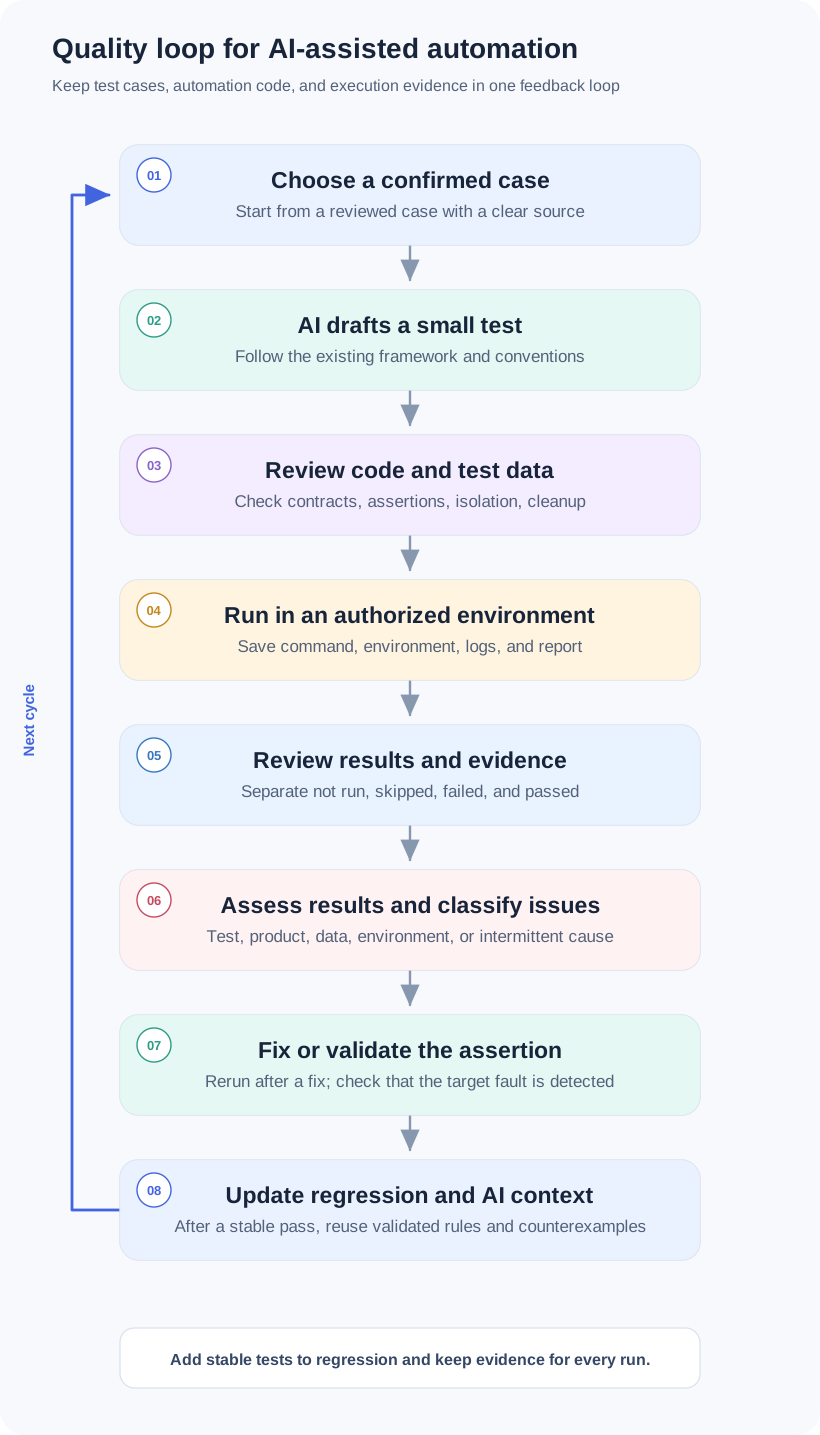
In daily work, start each new story or rule with one high-value, confirmed manual case. AI proposes a reviewable change that follows project conventions; a tester checks the code, data, and assertions before execution. When it fails, find the cause first, then fix the relevant test, product behavior, data setup, or environment and rerun the same case. After a stable pass, check whether the test would fail when the target behavior breaks, then add the case, execution evidence, and validated helpers to the regression set.
Feed this loop back into AI generation too. Add confirmed project conventions, common failures, and correct examples to the context. Keep unknown behavior as an open question instead of turning a temporary fix or unconfirmed assumption into a general rule. After changing requirements, frameworks, models, or Agent tools, use the same samples to confirm that generation and execution remain reliable.
Playwright Python locators: https://playwright.dev/python/docs/locators Playwright Python assertions: https://playwright.dev/python/docs/test-assertions