
Quality feedback needs to reach the team before the sprint ends, while there is still time to act. Keep scope, test readiness, execution evidence, and open risks visible as the iteration moves forward.
Sprint Testing Workflow tracks phases and gates. Other Skills clarify stories, design cases, prepare functional checks, report observed defects, and summarize the sprint. Whether to continue to the next handoff depends on the story and available context.
Workflow at a glance
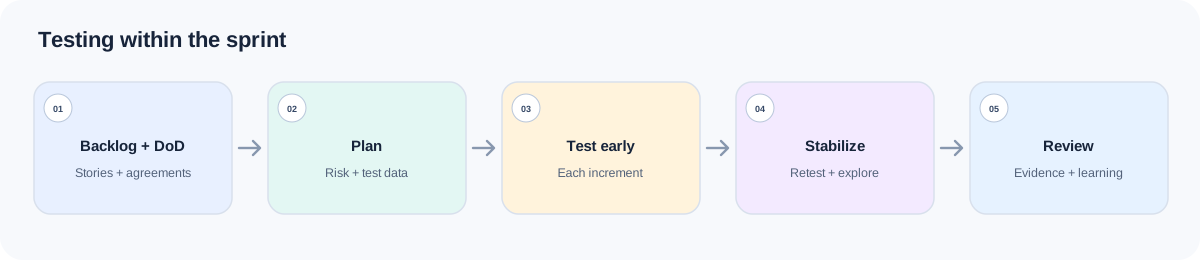
| Stage | Primary Skill | Exit evidence |
|---|---|---|
| Plan the iteration | Sprint Testing Workflow | Scope, risk order, owners, current gate, next focused handoff |
| Clarify a story if needed | Requirements Analysis | Rules, gaps, dependencies, and confirmed questions |
| Prepare executable checks | Test Case Writing | Prioritized cases traced to accepted behavior |
| Test an increment | Functional Testing | Core-flow coverage, scenario priorities, execution notes |
| Record a reproducible failure | Bug Reporting | Reproduction, impact, expected/actual, evidence |
| Review and carry forward | Test Reporting | Evidence-based status, residual risk, and next-sprint actions |
The source Skill’s two-week cadence is an example. Map the stages to your sprint length, delivery events, team capacity, and release calendar. Call one primary Skill for the current focus; add a handoff when the work needs it.
Install the Skills together
npx skills add naodeng/awesome-qa-skills --skill sprint-testing-workflow -g
npx skills add naodeng/awesome-qa-skills --skill requirements-analysis -g
npx skills add naodeng/awesome-qa-skills --skill test-case-writing -g
npx skills add naodeng/awesome-qa-skills --skill functional-testing -g
npx skills add naodeng/awesome-qa-skills --skill bug-reporting -g
npx skills add naodeng/awesome-qa-skills --skill test-reporting -g
For Chinese versions, use https://github.com/naodeng/awesome-qa-skills/tree/main/skills/zh as the source and keep each --skill name. These commands install at user scope (-g); remove -g for a project-local install, or add -a codex to target Codex. You can install the set once and invoke a specialist only when the current stage needs it. Invocation depends on the agent: describe the task when it supports automatic discovery, or use its supported syntax to select a Skill. The @skill lines below are examples. In every call, state the story or task scope and attach files that establish its behavior. If a newly installed Skill does not appear, reload the session and check that agent’s installation instructions.
Prepare a sprint context pack with the sprint goal, selected stories, Definition of Done, team capacity, environment/data strategy, known risks and technical debt, carryover defects, and release proximity. For a story, include its acceptance criteria, product rules, design/API contract, relevant changed code, and related tests. Include a branch or build identifier where it matters.
Sprint planning: scope, cadence, and exit criteria
Sprint Testing Workflow — map stages and gates
Start here when planning the iteration, changing priorities, or assessing sprint exit. It organizes the phases and identifies the current gate; it does not replace detailed requirements analysis, test cases, or execution reports.
Example document paths (replace them with the corresponding documents that exist in your project): sprint/PAY-48-goal.md (sprint goal), backlog/PAY-482.md (requirement), docs/qa/definition-of-done.md (definition of done), qa/carryover.md (carryover), and docs/qa/environment-plan.md (environment plan).
@skill sprint-testing-workflow
Plan QA for sprint PAY-48. Goal: support partial refunds in the web app and API.
Read sprint/PAY-48-goal.md, backlog/PAY-482.md, docs/qa/definition-of-done.md,
qa/carryover.md, and docs/qa/environment-plan.md.
Capacity is 2 QA engineers; the sprint is one week and release 4.18.2 is near.
Map the workflow to this cadence. Return in/out of scope, current stage,
gate board, P0-P2 queue, exit evidence, risks, and exactly one next Skill
handoff. Do not invent dates, owners, or test results.
The output should state sprint goals and scope, stage and gate status, the priority queue, exit criteria, and the next handoff. If scope changes, update the story list and re-rank the queue.
Story shaping: confirm behavior before designing cases
Requirements Analysis — resolve story-level uncertainty
Use this Skill only where the story, acceptance criteria, or source documents leave a material ambiguity. Attach the story, product rules, prototype/design, technical notes, dependencies, and known issues. Ask for specific questions to take back to the product or engineering owner.
Example document paths (replace them with the corresponding documents that exist in your project): backlog/PAY-482.md (requirement), product/refund-policy.md (business rules), design/refund-v3.md (design), and api/refunds.yaml (API contract).
@skill requirements-analysis
Analyze PAY-482 using backlog/PAY-482.md, product/refund-policy.md,
design/refund-v3.md, api/refunds.yaml, and services/refund/.
Compare the sources. Separate confirmed behavior from assumptions, list
missing and conflicting rules, assess impact on testability, and provide
specific questions for the owner. Do not write the cases yet.
The output should cover requirement understanding, rule gaps, risk, testability, and open questions. Skip this step when the story is already clear.
Test Case Writing — turn confirmed behavior into cases
Once the owner confirms rules that affect pass/fail, give the Skill the decisions, requirements, scope, environment, roles/permissions, data constraints, prior defects, and required output format.
Example document: qa/decisions/PAY-482-refund-rules.md is a sample decision record for confirmed rules. Replace it with the actual source in your project.
@skill test-case-writing
Write a prioritized case suite for the confirmed PAY-482 behavior in
qa/decisions/PAY-482-refund-rules.md. Include preconditions, test data,
steps, decidable expected results, priority, and a Trace to an acceptance
criterion or rule for each case. Cover relevant positive, negative, and
boundary behavior. List unresolved assumptions separately; do not invent
limits or API outcomes.
The output should be one unified, executable suite with traceable cases and explicit gaps. It is a design artifact, not a report of test execution. If a high-risk rule is still unresolved, mark the affected case as blocked on clarification rather than inventing an oracle.
Testing an increment: prepare checks and capture real failures
Functional Testing — prepare checks for an increment
Use Functional Testing when a story or integrated flow is ready for a focused check. Provide the target build, users/roles, feature flow, requirements, test data, environment, existing cases, and known weak areas. If Test Case Writing already produced a complete suite, ask Functional Testing to prioritize it and find integration or state gaps rather than generating the cases again.
Example document paths (replace them with the corresponding documents that exist in your project): docs/product/refund-policy.md (refund rules) and qa/cases/PAY-482.md (test cases).
@skill functional-testing
Prepare execution priorities for partial refunds on build 4.18.2-sprint-rc1.
Read docs/product/refund-policy.md, services/refund/, tests/refund/,
and qa/cases/PAY-482.md. Group coverage by user flow and business goal.
Call out role, data-state, negative, boundary, and integration checks that matter.
Return execution notes and open questions; do not claim the build was tested.
Expect task understanding, risk priorities, core functional coverage, scenario list, execution notes, and open questions. A tester or automation pipeline still needs to run the checks and record evidence.
Bug Reporting — capture a failure from the run
Invoke Bug Reporting only after observing a failure. Pass the exact build/environment, account and starting state, reproduction steps, actual and expected outcome with the rule source, frequency, impact, and logs/screenshots. Separate confirmed behavior from a root-cause theory.
Example document: qa/repro/PAY-482-2.md is a sample defect reproduction record. Replace it with your project’s actual record and attach the related evidence.
@skill bug-reporting
Create a report for the partial-refund failure observed on build 4.18.2-sprint-rc1.
Reproduction and actual/expected behavior are in qa/repro/PAY-482-2.md;
attach qa/evidence/PAY-482-2/console.log and the screen recording.
Include environment, preconditions, frequency, impact, and evidence. Do not
state a root cause unless the evidence establishes one.
The output is a bug summary, environment and preconditions, reproduction steps, actual versus expected, impact, and evidence/notes. If the issue is not reproducible yet, keep it as an observation with uncertainty instead of overstating it as a confirmed bug.
Sprint review: assess exit from the evidence
Test Reporting — assess the sprint exit
At review, attach test-run exports, the defect list, covered and untested scope, build/environment, blocked work, deferred checks, and accepted risks with their authorized owner. The Skill needs actual evidence to make a quality statement.
@skill test-reporting
Prepare the sprint QA review from attached PAY-48 run exports, defect export,
and carryover list. State what was tested and not tested, blockers, critical
issues, coverage confidence, residual risks, and next-sprint actions.
Trace status and defect claims to evidence. If run or defect evidence is missing,
state quality_status as not executed or insufficient evidence.
Use the report to inform the workflow’s exit gate. A P0 failure must be fixed or accepted in writing by the authorized role; a story without its agreed evidence is not Done just because the sprint ended.
Best practices
Keep the workflow stage-level
Use it to track phases and gates; use the specialist for the current artifact.
Set entry and exit criteria before a story moves
“Merged” is not equivalent to test-ready or Done.
Re-rank on scope change
Record what moved out, what remains at risk, and who owns the decision.
Carry evidence into review
Planned work, drafted cases, executed results, and accepted risks are different states.
FAQ
Are the day numbers in the workflow mandatory?
No. The sample two-week cadence is illustrative. Map the phases to your real iteration and do not remove readiness, feature-complete, or exit gates to fit the calendar.
Should I call every Skill for every story?
No. Start with the workflow, then invoke a focused Skill only when the stage needs its artifact. Skip requirements analysis for an unambiguous story; skip bug reporting when there was no observed failure.
Can an unresolved P0 be carried into the next sprint as Done?
Not by default. It blocks sprint exit unless the authorized owner accepts the risk in writing and the residual risk is recorded.
Does a case suite prove the story passed?
No. The suite describes what to run. The test run, build, environment, and results must be supplied separately.
References
- Awesome QA Skills:https://github.com/naodeng/awesome-qa-skills
- Sprint Testing Workflow:https://github.com/naodeng/awesome-qa-skills/tree/main/skills/en/testing-workflows/sprint-testing-workflow
- Requirements Analysis:https://github.com/naodeng/awesome-qa-skills/tree/main/skills/en/testing-types/requirements-analysis
- Test Case Writing:https://github.com/naodeng/awesome-qa-skills/tree/main/skills/en/testing-types/test-case-writing
- Functional Testing:https://github.com/naodeng/awesome-qa-skills/tree/main/skills/en/testing-types/functional-testing
- Bug Reporting:https://github.com/naodeng/awesome-qa-skills/tree/main/skills/en/testing-types/bug-reporting
- Test Reporting:https://github.com/naodeng/awesome-qa-skills/tree/main/skills/en/testing-types/test-reporting