
dsh-qa v0.5.3: From Harness Compatibility to a Native QA Workbench
The previous stage of dsh-qa had a practical focus:
How can a QA-oriented extension run reliably on top of DeepSeek Harness?
The project started with a QA preset and the first Workbench, then built a more stable host boundary by fixing Harness API compatibility issues.
These releases now cover more than API fixes and new QA pages.
From v0.4.1 to v0.5.3, dsh-qa moved from a QA tool running alongside Harness toward a more deeply integrated QA Control Workbench.
Project: https://github.com/naodeng/dsh-qa
For the original product overview, read dsh-qa: An AI Testing Workbench Inside DeepSeek Harness. For a complete project walkthrough, continue with From Requirements to Release: Running a Full Test Project with dsh-qa.
What problems does this iteration try to solve?
Before this release series, dsh-qa already provided several QA workflow capabilities:
- QA Persona
- QA Skills
- Test Dashboard
- Project Kanban
- Calendar
- Quality Tasks
- Controlled Execution
- Evidence
- Quality Gates
- PASS / WARN / BLOCK
Once those capabilities ran inside Harness, new problems became visible.
1. The QA Workbench worked, but was not native enough
Earlier implementations used host DOM selectors, MutationObserver, and host-page structure to find the Workbench mount point.
That approach worked, but it created an undesirable dependency:
dsh-qa needed to understand how the Harness UI was implemented instead of depending only on a public extension contract.
If the host DOM changed, the plugin could break even when the actual Harness capability had not changed.
A long-lived extension needs a boundary that survives host UI changes.
2. Harness APIs are still evolving
The earlier compatibility work made this clear.
Interfaces and contracts around areas such as:
client-request
session/follow
Remote mux
skills/list
commands/execute
Persona schema
QA preset workflow
continue to evolve with Harness.
So dsh-qa needs more than a current working build.
The project also needs to make clear:
- which Harness version is supported;
- which API contracts are expected;
- which integration paths have been verified against a real host;
- and how regressions can be detected after a Harness upgrade.
3. Users need to know which version they are running
As releases moved faster, another practical problem appeared:
Which version of dsh-qa is actually installed?
And more importantly:
- What is the latest version?
- Which DSH version is compatible?
- What changed recently?
- Should the installation be upgraded?
Previously, finding this information meant opening npm or GitHub.
For a tool with a graphical Workbench, that is unnecessary friction.
4. The Workbench accumulated features faster than hierarchy
As more capabilities arrived, the first screen became crowded.
The Workbench could show:
Projects
Metrics
Calendar
Tasks
AI Status
DSH Chat
Skills
Quality Gates
Those elements do not all deserve the same weight.
When a QA engineer opens the Workbench, the first question is:
What needs my attention right now?
That became another focus of this release series.
v0.4.1: Stabilizing the Harness contract first
v0.4.1 focused on Harness compatibility hardening. It did not add visible product features.
The release locked down the current contracts around:
client-request
session/follow
snapshot.records
cursor
/api/remote.mux
It aligned the integration with:
QA preset workflow
Persona prefix
skills/list
commands/execute
submittedAttachments
Real Harness Host Smoke testing also became part of the compatibility evidence.
Mocks and local API tests cover dsh-qa itself; critical integration paths also need verification against a real Harness host.
The release completed:
141 Unit / API tests
22 Chromium E2E tests
4 / 4 Harness Host Smoke cases
GitHub Actions PASS
Those Host Smoke cases targeted dsh-v0.1.6-alpha.1. They are the historical v0.4.1 compatibility baseline: evidence for the RPC, Session, and Workbench paths at that point, not automatic proof of the later native Panel lifecycle.
That work prepared the next change.
v0.5.0: The QA Workbench becomes a native Harness Panel
v0.5.0 moved the Workbench onto official Harness extension slots instead of relying on the Harness page structure:
sidebar.panellist
root-scoped keyed main slot
The integration changed from:
Find the Harness DOM
        ↓
Observe page mutations
        ↓
Inject the QA UI
to:
Harness Extension Contract
        ↓
Panel Slot
        ↓
QA Workbench
The mount point changed, and so did the project boundary.
Why does a native Panel matter?
The extension boundary should look like this:
dsh-qa
   │
   │ Plugin / Panel Contract
   ▼
DeepSeek Harness
Rather than:
dsh-qa
   │
   │ CSS Selector
   │ DOM Structure
   │ MutationObserver
   ▼
Harness UI Implementation
The second model couples dsh-qa to an implementation. The first couples it to a contract.
As part of v0.5.0, the project removed its core dependency on:
Host DOM Selector
MutationObserver
Custom Panel Activation
while retaining:
- embedded Workbench iframes;
- popout windows;
- Panel closing;
- postMessage flows;
- project restoration;
- host refresh;
- plugin unloading.
The release also added regression coverage for the native Panel lifecycle.
For long-term maintenance, this matters more than another QA feature. It determines whether dsh-qa can remain a maintainable Harness extension as the host evolves.
The local verification for this version included 152 unit/API tests and 23 Chromium E2E tests. The target dsh-v0.1.6-alpha.1 host completed 5 passed / 1 skipped; the only skipped case had no second global Panel, while plugin unload and restore were manually verified on the real host.
v0.5.1: Moving to the Harness 0.1.7 Profile Bundle model
Harness continues to change quickly.
After the native Panel integration, dsh-qa followed the new Harness Profile Bundle model.
The existing qa preset:
qawas migrated into a declarative profile bundle for Harness 0.1.7.
At the same time, the quality-control bundle:
quality-controlbecame an independent Profile Bundle.
This separates different QA capabilities more clearly.
For example:
qa
├── QA Persona
├── QA Skills
└── QA Workbench
can evolve independently from:
quality-control
├── Quality Tasks
├── Controlled Execution
├── Evidence
└── Quality Gates
instead of requiring every capability to live inside a single preset.
The installers also moved to the profile-bundle model, with explicit profile, DSH executable, and dry-run options instead of writing legacy preset directories.
The release also hardened:
- Workbench popout cleanup;
- iframe remount behavior;
- frame readiness;
- Harness 0.1.7 Host Smoke testing.
The real host target was updated to:
dsh-v0.1.7-alpha.1The qa bundle’s real Host Smoke completed with 6 passed. That result covers the plugin entry, Panel/Slot, Workbench, Session/RPC, and refresh/reconnect paths exercised by the qa bundle. The independent quality-control bundle still has no real-host runtime verification.
The focused compatibility suite was 14/14, the full unit/API suite was 159/159, and the isolated full E2E gate passed with 159 unit/API tests plus 23 Chromium E2E tests.
v0.5.2: Bringing version awareness into the Workbench
As release frequency increased, I did not want users to leave the Workbench to find out which version they were using.
v0.5.2 introduced a Settings / Version entry.
The Workbench now exposes:
Installed Version
Latest Version
Compatible DSH Version
GitHub Repository
Project Website
The installed version is visible near the product identity, and the UI can surface an available update.
Opening the version view provides access to the release history.
Release History is more than a list of version numbers
The release view shows more than a list of version numbers:
0.5.3
0.5.2
0.5.1
It acts as a lightweight update center for the project.
Release information is:
- ordered by publication time;
- localized to the currently selected language;
- paginated;
- linked back to the full GitHub Release when more detail is needed.
This version also brought bilingual language switching into Settings.
If dsh-qa is going to be used long term, then:
versioning, compatibility, and release visibility are themselves product capabilities.
The v0.5.2 verification result was 160 unit/API tests and 25 Chromium E2E tests passed.
v0.5.3: Reorganizing the QA Workbench
v0.5.3 shifted attention back to the Workbench itself.
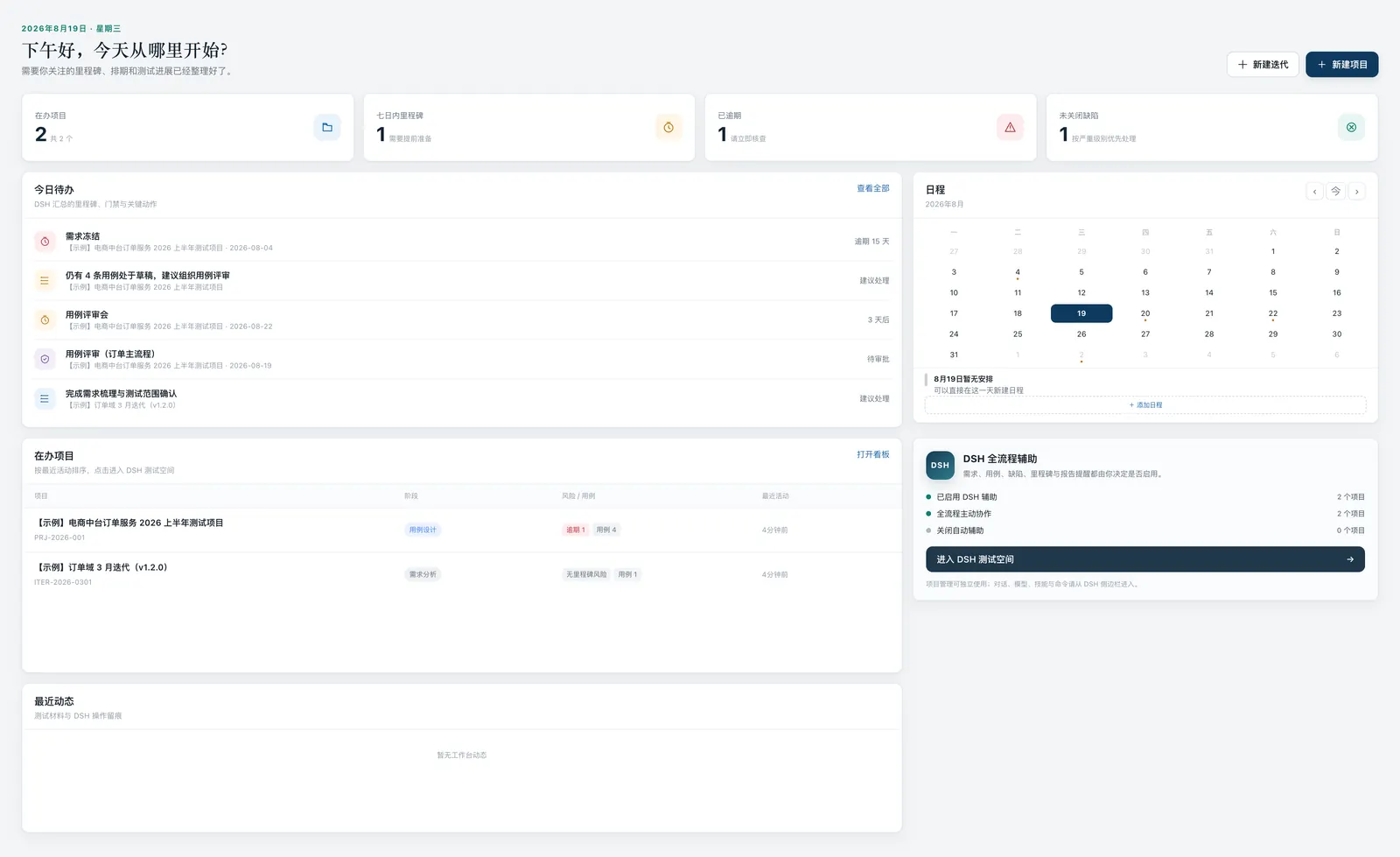
This version introduced Quiet Studio, a visual direction with a direct goal: reduce visual noise and improve the information hierarchy of the QA workspace.
From a dashboard to an action-oriented Workbench
The Workbench contained many useful elements:
Projects
Metrics
Calendar
Tasks
AI Status
DSH Chat
Skills
Quality Gates
They should not all compete for the same level of attention.
When a QA engineer opens the Workbench, the natural sequence is closer to:
What changed?
        ↓
What needs attention?
        ↓
Which project is at risk?
        ↓
Where should I go next?
The goal is a next action, not a wall of equally weighted metrics.
The updated Workbench now prioritizes:
- information hierarchy;
- first-screen action paths;
- recent projects;
- visible risks;
- navigation reachability;
- readability on light surfaces.
The project structure was reorganized as well
Another less visible change is repository organization.
The codebase is organized around clearer responsibilities:
lib/
server/
public/
preset/
scripts/
test/
docs/
assets/
The test workspace is:
test/It acts as the single test workspace.
Unit tests, E2E tests, fixtures, support code, configuration, and generated test-result entry points are consolidated there.
Meanwhile:
docs/quality-workbench/contains product requirements, technical design, roadmaps, and review records.
docs/superpowers/continues to store specifications, implementation plans, and exploration documents.
It does not create a visible feature. As the project grows, repository boundaries become part of the maintenance cost.
The test suite continues to grow with the product
By v0.5.3, the current verification includes:
162 Unit / API tests
32 Chromium E2E tests
npm pack --dry-run PASS
The coverage boundary has expanded from:
APItoward:
API
↓
Harness Contract
↓
Workbench
↓
Panel Lifecycle
↓
Release Metadata
↓
Navigation
↓
UI Regression
Since dsh-qa is a QA-oriented project, I want it to follow the quality practices it promotes.
Behavioral changes therefore increasingly begin with executable tests.
So what is dsh-qa now?
After this release series, the project definition is clearer.
It is not intended to become:
another traditional test management systemand it is not simply:
a collection of QA prompts for HarnessThe direction is closer to:
DeepSeek Harness
        ↓
QA Persona + Skills
        ↓
QA Workbench
        ↓
Quality Tasks
        ↓
Controlled Execution
        ↓
Evidence
        ↓
Quality Gates
        ↓
PASS / WARN / BLOCK
In other words, it is:
a QA Control Workbench built on top of an agent runtime.
The important question is no longer only:
Can AI generate tests for me?
The more interesting question is:
When AI begins participating directly in engineering and testing workflows, how should QA define work, constrain execution, collect evidence, and make explainable quality decisions?
The boundary remains explicit: v0.5.3 organizes the Workbench, Panel, version information, and quality records, while Native QA Execution remains on the later roadmap. Planned execution capability is not delivered capability.
Next: From Control Workbench to Action Desk
The project now has:
- a QA Workbench;
- native Harness Panel integration;
- QA and Quality Control profiles;
- projects and tasks;
- evidence;
- quality gates;
- version awareness.
The next mainline is v0.6.0: Native QA Execution & Action Desk.
The next stage addresses a practical part of the workflow:
Once QA understands the risk, how quickly can the user move into the next action?
The Action Desk will not create a second quality data model. It is a read-oriented action surface over existing execution, evidence, and gate facts.
Instead of only saying:
There are three risks.the Workbench should increasingly help answer:
Which project should I open?
Which test should I run?
Which DSH session should I return to?
Which evidence needs review?
Should I rerun the task or start a review?
The current route plans to connect an Execution Profile to Harness Browser Use, Computer Use, or MCP, write the result back to TestRun / EvidenceBundle, and expose execution state through a controlled Action Queue.
This remains planned work: no arbitrary tool calls, no PASS without evidence, and no replacement of human approval by AI.
Beyond that, I will keep exploring:
Quality Obligation
Evidence Graph
Adapters
Policy
Quality Intelligence
Multi-Agent QA
Autonomous QE
Current verification boundaries
Different kinds of evidence should not be compressed into one claim of “compatibility.” The current state is:
| Scope | Current result |
|---|---|
| v0.4.1 Harness 0.1.6 baseline | 4/4 real Host Smoke cases; historical compatibility evidence |
| v0.5.0 Native Panel | 5 passed / 1 skipped on the host; unload and restore manually verified |
| v0.5.1 Harness 0.1.7 | 6 passed real Host Smoke cases for the qa bundle |
| v0.5.1 quality-control bundle | Real-host runtime still unassessed |
| v0.5.3 local verification | 162 unit/API tests, 32 Chromium E2E tests, and npm pack dry-run passed |
| npm, Git tag, GitHub Release | Independent delivery facts that must be checked separately |
That is why the dsh-qa documentation records what the code does, what local tests ran, and what a real host verified as separate facts. They are related, but they are not the same thing.
Final thoughts
dsh-qa is still experimental.
The recent releases made the direction clearer:
I do not want to turn it into a large traditional testing platform.
The goal is to keep it:
Local-first
Harness-native
QA-oriented
Evidence-driven
Controllable
and use it to explore a more specific question:
When agents become first-class participants in software delivery, what should the QA workspace look like?
That is the direction dsh-qa will continue to explore.
Project: https://github.com/naodeng/dsh-qa
Full release notes: dsh-qa v0.5.3 Release