
In August, dsh-qa began as a local QA workbench inside DeepSeek Harness: requirements, test cases, defects, milestones, reports, and approval gates could stay in one project space. It started with a simple problem — testing work should not be scattered between chat transcripts, spreadsheets, and separate systems.
From v0.1.3 to v0.1.8, the project made the daily workbench more usable with a bilingual UI, test coverage, and a complete QA Skill lifecycle. The v0.2.0 release on September 1 brings source, execution, and evidence into a traceable quality-control flow.
This post explains how these updates make a quality conclusion easier to trace to its source, evidence, and decision owner.
For an introduction to the original workbench, read dsh-qa: An AI Testing Workbench Inside DeepSeek Harness. For a project-level walkthrough, continue with From Requirements to Release: Running a Full Test Project with dsh-qa.
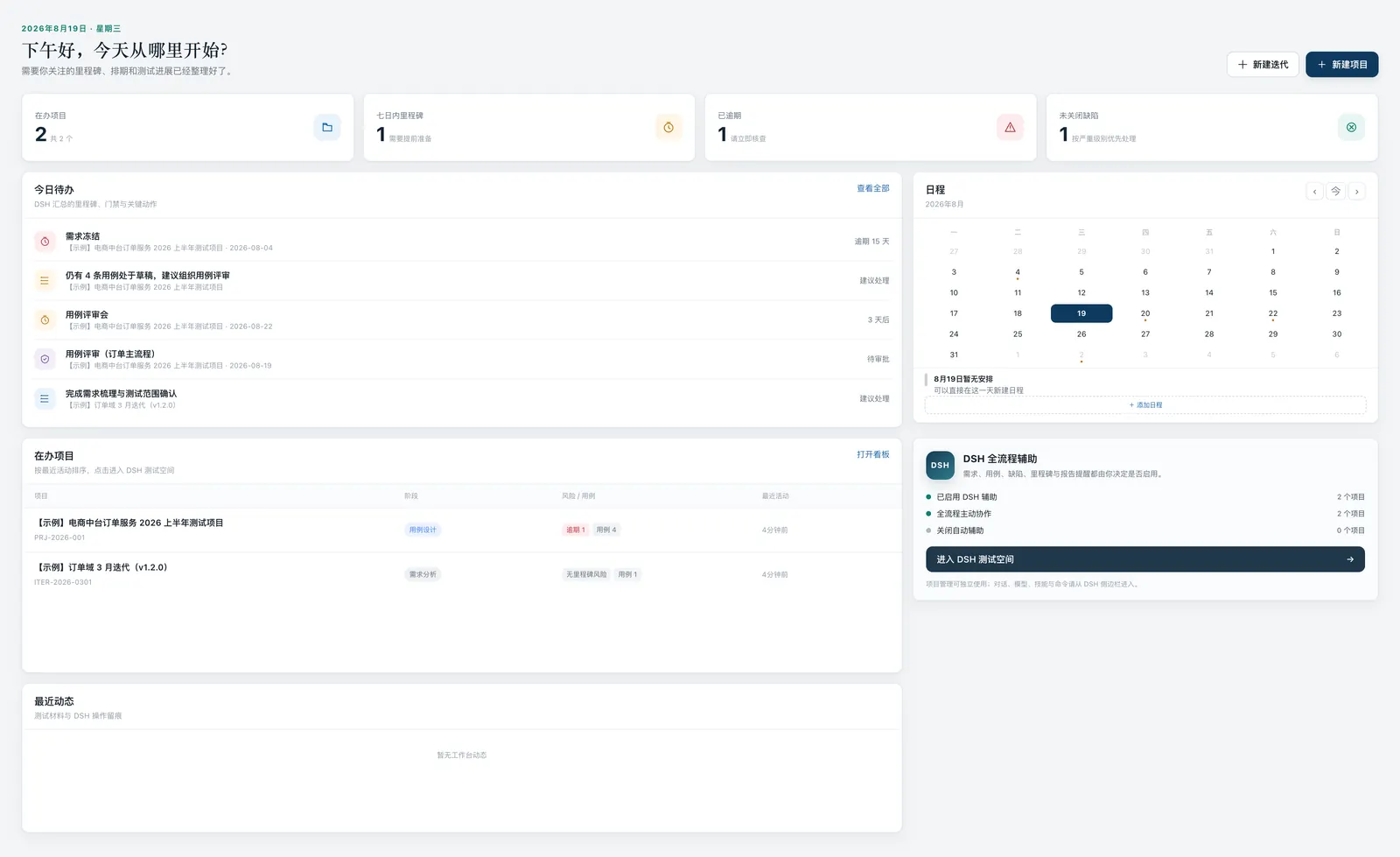
First, make the daily workbench dependable
The earlier releases may look separate at first glance, but each one removes friction from daily QA work.
v0.1.3 introduced immediate Chinese/English switching across navigation, dashboards, boards, calendars, chat, and drawer and modal titles. For a team working across languages, that is more than translating a menu: board stages, feedback, and project context must still mean the same thing after the language changes, or the interface creates a second vocabulary for the process.
v0.1.4 connected node:test unit tests, Playwright end-to-end tests, and GitHub Actions CI. A quality workbench needs quality evidence of its own. Board projections, statistics, calendar reminders, HTTP APIs, and project lifecycle behavior should not depend on one successful manual demo.
v0.1.5 continued that work with a refined Quality Control Room, a QA triage dashboard, and consistent card interaction across workspaces. A tester can see risks, gates, and active projects before opening the material needed to act on them.
A Skill is no longer merely installed
Versions v0.1.6 through v0.1.8 focus on the QA Skill journey.
The workbench gained a language-aware, category-based QA Skill installer and completed the qa preset and related end-to-end flows. In v0.1.7, Skill cards began to show installed state and offer confirmed removal with bilingual feedback. v0.1.8 then improved recommendations for Skills that are already installed.
This solves an easy-to-miss operational problem: an installable capability needs visible state. A user can see whether a Skill is available to DSH and remove it through the workbench when it is no longer needed. Install, recognition, recommendation, and uninstall form a lifecycle for managing project capability.
The responsibilities remain separate. dsh-qa presents and manages local install state; the Skill content and scope come from awesome-qa-skills; DSH still owns sessions, models, tools, and permissions. Clear boundaries are easier to operate than a single interface that tries to absorb every configuration concern.
v0.2.0: Put the quality conclusion back beside its source and evidence
The central addition in v0.2.0 is a QA control workbench. It organizes several connected records around a quality task: source snapshots, risks, test scope, test plans, execution profiles, controlled local runs, evidence bundles, failure analysis, and regression sets.
That is an important shift. Teams can often see a “passed” result yet still struggle to answer three questions:
- Which version of the requirement or code defined the test scope?
- Under which configuration did this run actually execute?
- What evidence remains for failures, skips, or exceptions?
A source snapshot means the scope does not have to rely only on a description that was edited later. Execution profiles and controlled local runs connect results to their execution conditions. Evidence bundles and failure analysis turn a failed state from a single line into material that can be reviewed, investigated, and included in a regression set.
These records restore the context needed to judge a result. The team can check what a conclusion covers, what it omits, and whether the evidence is sufficient.
Computed gates inform a decision; they do not make it
This release also adds computed quality gates, delivery reports, trends, and controlled exceptions. A gate can produce PASS, WARN, or BLOCK to assist a delivery decision.
These states communicate delivery risk:
PASSmeans the current rules and recorded evidence meet the pass conditions.WARNmeans a risk, gap, or exception needs explicit assessment or acceptance.BLOCKmeans a critical condition or piece of evidence is missing, so delivery should not be treated as meeting its quality requirements.
A controlled exception records why it exists, who accepts the risk, and when it must be revisited. Trends then show whether the team is reducing risk or repeatedly encountering the same evidence gap.
This continues the original dsh-qa authority boundary: AI can organize material, request a gate, and assist analysis; a responsible person still decides whether to release and whether to accept risk. Tools can improve the quality of a decision, but cannot inherit the responsibility for it.
Project details become a workspace
v0.2.0 also promotes project details into a full workspace. Dashboard and kanban cards can open it directly, while the dashboard lists up to five active projects. This may look like a navigation change, but it changes how information is organized.
The project workspace brings together quality tasks, scope, execution, evidence, risk, and delivery reports. The dashboard answers “what needs attention now?”; the workspace records “why did we reach this conclusion?” The two layers keep everyday follow-up focused and retain a path back to the evidence.
Reliability boundaries are part of the release
Once a QA workbench can perform controlled local runs, reliability and security stop being optional. v0.2.0 hardens source-path boundaries, run authorization, minimized execution environments, process-tree termination, evidence recovery, and quota management. It also fixes deferred-persistence first writes and restoration of quality-gate results after a detail refresh.
These details may not belong on a product poster, but they decide whether records can be trusted. A task that can escape its source-path boundary, or leave child processes behind, creates local risk instead of managing it. A UI that loses gate results on refresh cannot credibly support audit or delivery communication.
The release reports 98 passing unit/API tests, 20 passing Chromium end-to-end tests, and an npm package dry run containing 49 published files. Those figures describe the verification scope for the release; they are not a quality guarantee for any particular product being tested.
A practical way to try it
Choose one small, active testing task: freeze a source artifact, define the scope, configure one controlled run, return the result and evidence bundle to the task, and let the gate show whether it is PASS, WARN, or BLOCK.
That quickly reveals what the team actually lacks. It may be a clearer scope, an environment record, or regression evidence — not necessarily another page of AI-generated test cases.
Install the project through DSH:
dsh plugin --profile web add dsh-qaProject repository: https://github.com/naodeng/dsh-qa
Full release notes: dsh-qa v0.2.0 Release
dsh-qa is still early-stage software, particularly where it integrates with the quickly evolving DSH ecosystem, so start with a small and reviewable project. This release establishes a sustainable direction: AI can help testing move faster and organize more information, and every quality conclusion remains connected to its source, execution, evidence, and human decision.