
When AI can generate large amounts of code, test cases, automation scripts, and technical documentation in minutes, software development teams can seem to be entering an unprecedented era of efficiency.
Quality practitioners are also noticing new pressures:
- Development moves faster, while test teams struggle to keep up.
- Automation suites grow, but product quality does not clearly improve.
- Individuals gain speed with AI, while collaboration across teams gets harder.
- Code becomes cheaper to generate, while review, validation, and maintenance take more time.
- Quality problems that were already hidden in the delivery process become more visible, or grow more costly, after AI accelerates work.
We have spent a lot of time discussing how AI can help us work faster, and much less time asking how it can help us do better, deeper work.
On 20 November 2026, Neil Taylor, Shawn Vernier, Simon Tomes, Rosie Sherry, and Gary Hawkes discussed Bugberg, Boach, quality bottlenecks, team culture, and the new pressures around AI on episode 156 of Ministry of Testing’s This Week in Quality.
Gary Hawkes raised a question for quality practitioners: When everyone is using AI to work faster, who is using it to improve the quality of the work?
This article draws on the session, its transcript, and the accompanying notes. Bugberg, Boach, bottleneck shifting, the Quality Gap, and Faster Silos come from the discussion. The throughput example, AI quality measures, exploratory-testing prompt, AI Quality Bugberg workshop, and system-wide AI Native Quality Engineering model are practical extensions in this article; they are not formal research findings or models from the session.
Bugberg: the quality problems beneath the surface
Bugberg is a community visualization challenge from the Ministry of Testing community. It adapts the iceberg metaphor to software testing and quality engineering: visible symptoms sit above the water, while causes, risks, and costs remain harder to see below it.
Unlike a conventional iceberg, a Bugberg is shaped like a bug. Its feelers, hands, and legs can appear above the surface as separate problems while connecting beneath the water.
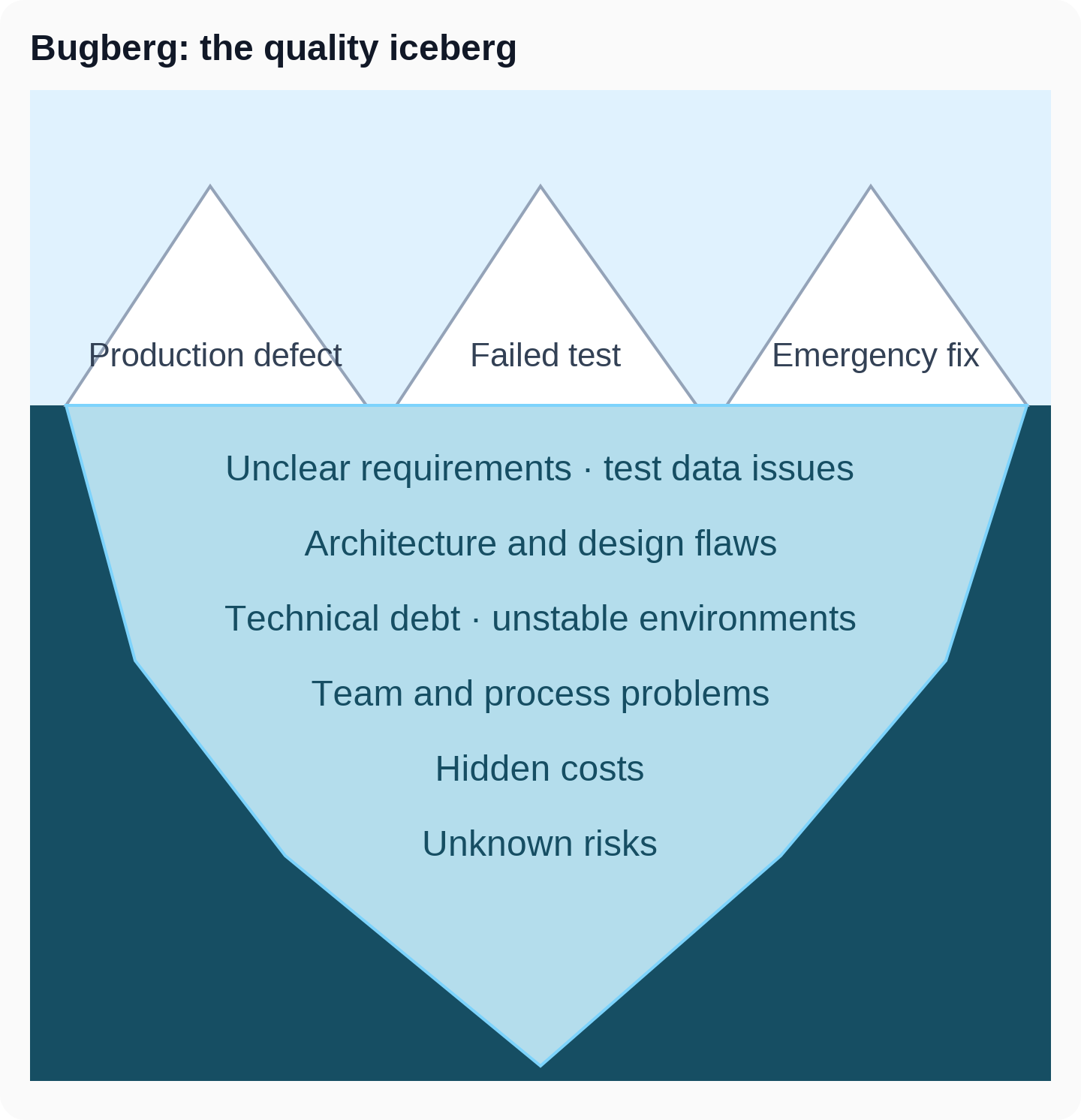
Figure: A concept illustration redrawn from the session discussion, not an original Ministry of Testing community image.
That shape reflects how software quality problems often appear. A production defect may look like a developer made a coding mistake. A closer look may uncover unclear requirements, a design flaw, inconsistent test environments, or weak communication across the team.
Fixing only the symptom leaves the conditions beneath it in place. They can surface again in a different form.
Different views of the quality iceberg
The session discussed Bugbergs created by community members. Each one starts from a different quality concern and makes less visible problems easier to discuss.
| Bugberg theme | Above the water: easy to see | Below the water: easier to miss |
|---|---|---|
| Justin Holsgrove: root-cause analysis | Bug reports, quick fixes, workarounds | Technical debt, environment issues, test data, unclear acceptance criteria |
| Underserved quality attributes | Security, availability, profitability | Maintainability, portability, accessibility |
| Melissa: the real scope of testing | Test cases, defect counts, automation, coverage | Quality planning, continuous improvement, stakeholder expectations, risk analysis |
| Simon Tomes: skills for quality work | Creativity, critical thinking, risk awareness | Care, listening, empathy, systems thinking |
| Rosie Sherry: exploratory testing | Reported defects, hotfixes, workarounds | Hidden costs, technical debt, unknown risks, related defects |
These examples do not define which attributes must sit above or below the surface. They show how a team’s priorities can change with its context, timing, and point of view.
The quality iceberg is not static
Icebergs can flip. Shawn noted that security had once been below the waterline for some teams, but security incidents and wider attention have made it visible in many Bugbergs. Simon suggested redrawing the exercise every year to see how a team’s priorities change.
Quality priorities change over time
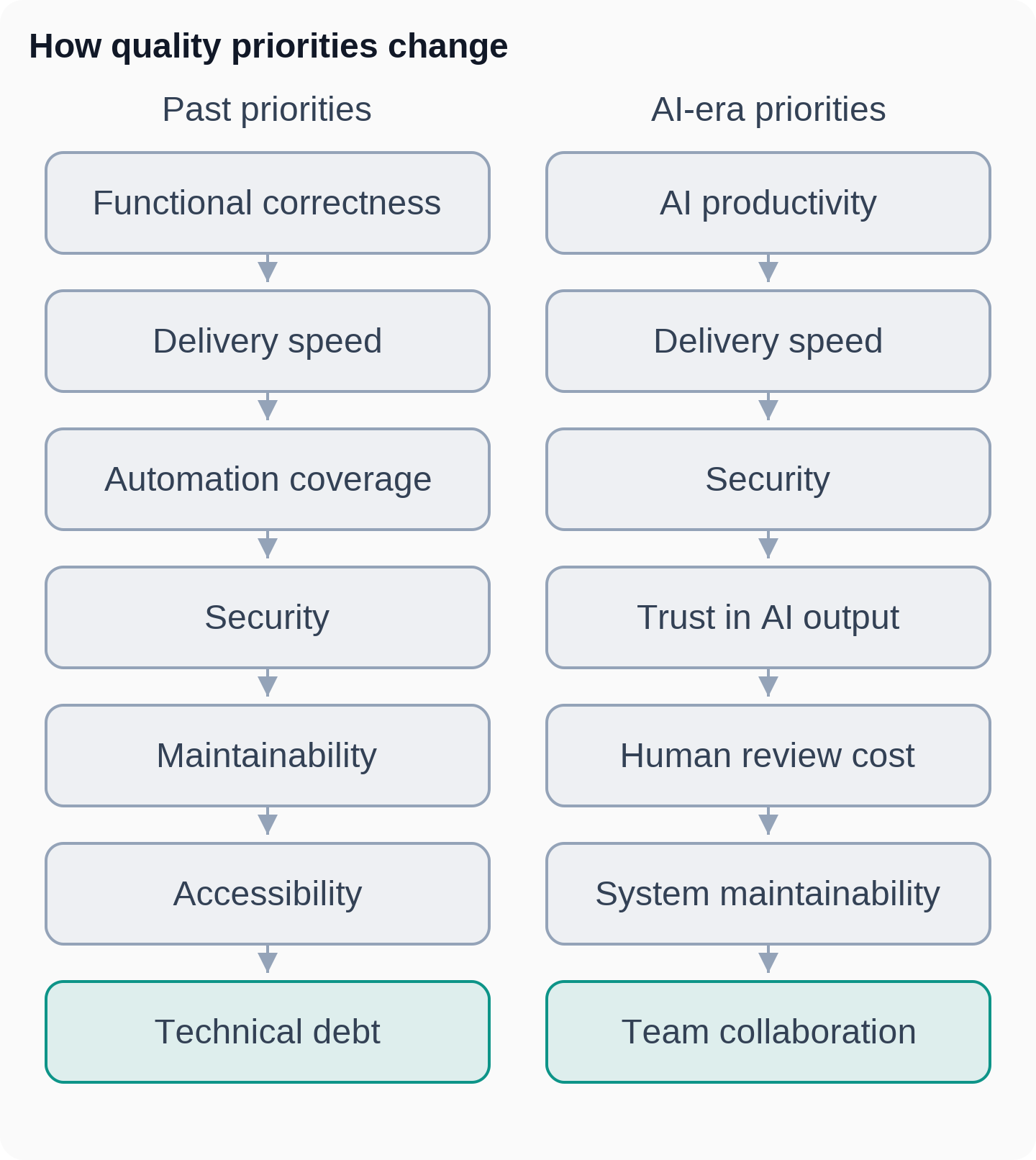
Figure: A hypothetical illustration of changing priorities, not an industry survey.
The figure compares functional correctness, delivery speed, automation coverage, security, maintainability, accessibility, and technical debt with AI productivity, delivery speed, security, trust in AI output, human review cost, system maintainability, and team collaboration. It is an example of how priorities might evolve, not a claim about industry-wide trends.
When an organization brings AI usage, code-generation speed, or test volume into view, it should also ask which quality concerns may be slipping out of sight.
Boach: AI can coach thinking, not only generate content
Another example from the session was Boach, a name combining “bug” and “coach.” Ministry of Testing built it as a Claude Skill to support the call for MoTaCon contributions.
Boach is intended to help people develop a talk proposal, rather than simply generate an abstract for them. It encourages contributors to search the MoTaverse for related articles, talks, and community discussions; explore what others have shared; connect with community members; and refine their own ideas.
Rosie Sherry described it as an MVP experiment. The team might later explore an MCP connection, a web version, or applications to more quality and technology topics.
From AI generation to AI-assisted thinking
Boach’s main difference from conventional AI generation is its role: it coaches a person through an idea instead of writing the finished content for them. The figure compares the two workflows.
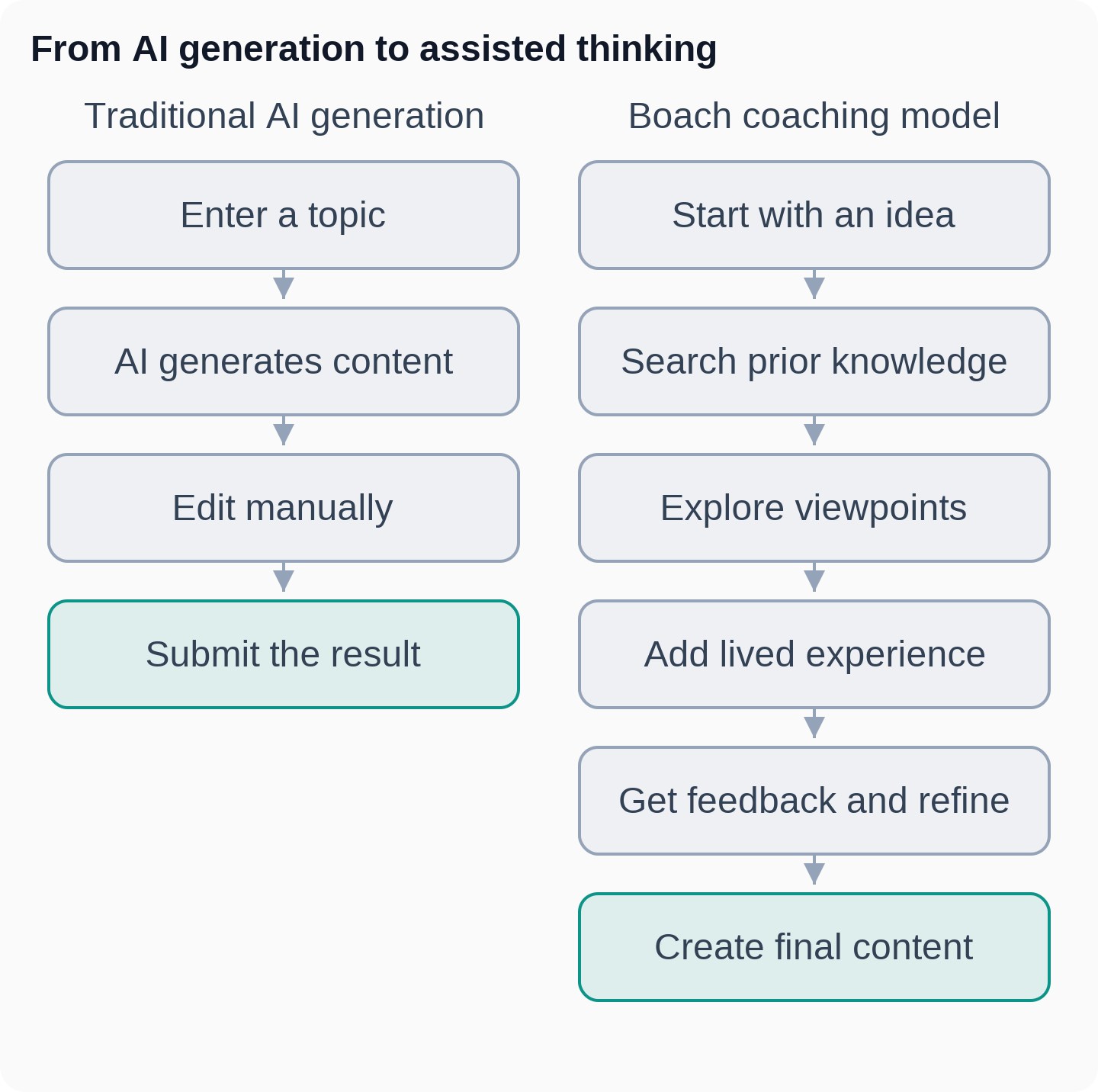
Figure: A workflow distilled from the Boach concept, not its internal architecture.
The table compares the two approaches by goal, knowledge source, and the work assigned to the person and the AI.
| Dimension | AI content generator | AI coach |
|---|---|---|
| Main goal | Produce an artifact quickly | Improve the user’s thinking |
| Knowledge | Model knowledge and supplied input | External knowledge, personal experience, community feedback |
| Human role | Prompt and edit the output | Explore, judge, and decide |
| AI role | Content producer | Guide and collaborator |
| Immediate value | Less writing time | More perspectives and depth |
| Longer-term value | Faster task completion | Stronger professional capability |
The same idea applies to software testing. Instead of only asking AI to generate test cases or a test strategy, a QA professional could use it as a design coach. Given an initial plan, AI could ask questions, search historical defects, examine system dependencies, and challenge assumptions that may hide gaps.
The QA professional still needs to understand, verify, and own the final strategy. AI suggestions are material to assess, not an answer to accept automatically.
AI knowledge should not displace personal experience
Shawn cautioned against letting what AI finds in existing material discourage people from contributing a different view. A subject may have been discussed many times; that does not prevent someone from bringing a new interpretation or challenging an older conclusion based on their own practice.
MoTaCon’s approach to proposals is one example. Rosie said the team considers more than an abstract, including the contributor’s MoTaverse profile and community participation. The topic may also change as the industry moves quickly. In that context, a person’s experience and contribution matter alongside the proposed subject. This is an approach described for that community, not a general rule for conference selection.
AI can retrieve prior knowledge, but a person’s project experience, failed attempts, and evidence can add something that is not in the historical material. Rosie also observed that a talk about someone’s own journey can be harder for AI to reproduce than a talk built around a model or diagram.
AI can move a bottleneck instead of removing it
Shawn warned that faster code generation can put more pressure on code review, testing, and production incident analysis.
Faster code commits do not automatically mean faster product delivery, and they do not prove that the product is better.
Shawn compared it to using a leaf blower to send the leaves from your yard into a neighbor’s yard. Your yard looks clear, but the problem has moved.
AI acceleration and the development process
The diagram contrasts a traditional workflow with one in which code generation is accelerated. Review and testing queues can grow, and defects may reach production before the delivery system has adapted.
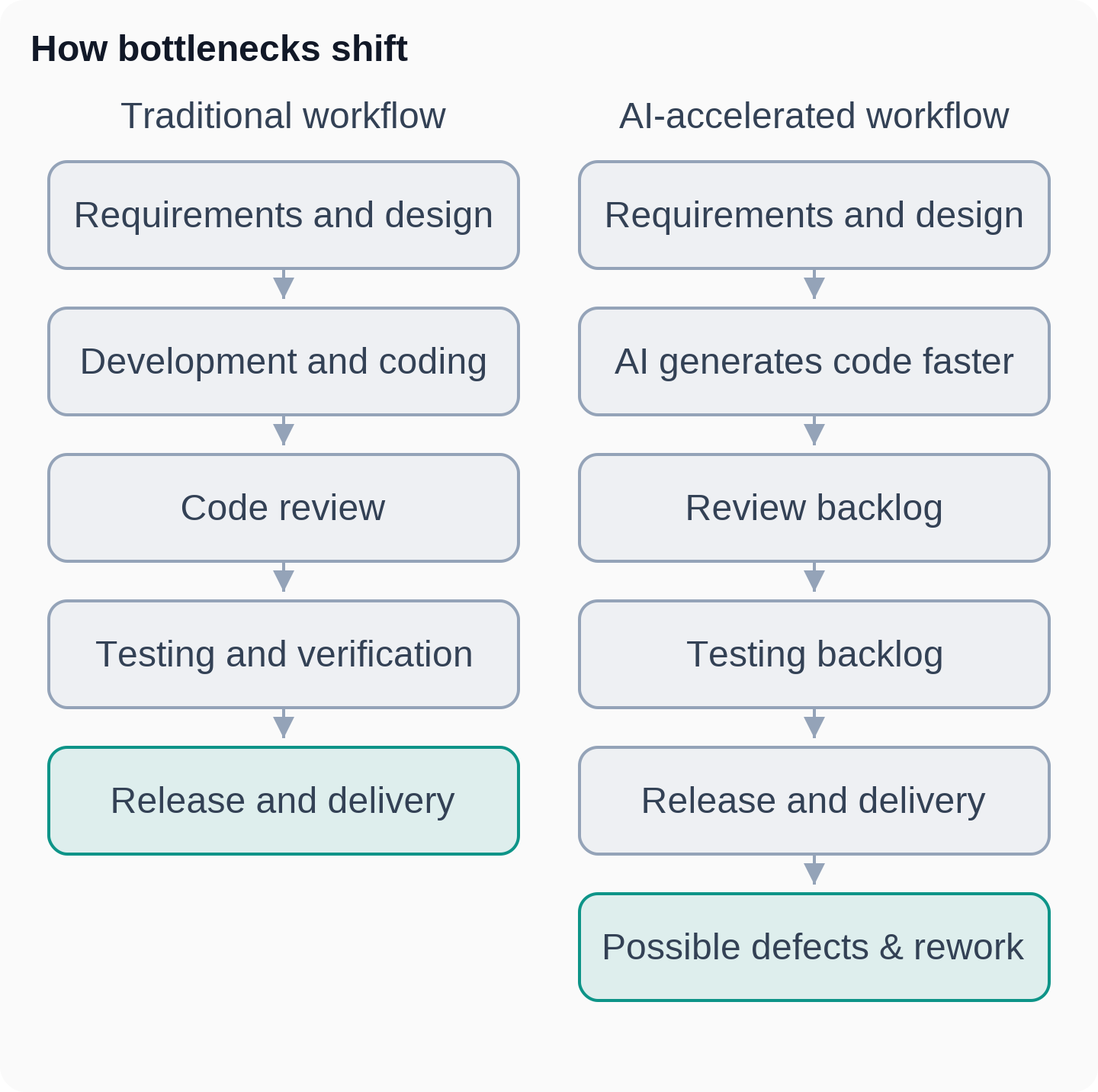
Figure: A conceptual view of bottleneck shifting.
Bottleneck shifting
The Theory of Constraints (TOC) holds that a system’s throughput is limited by its current constraint. If AI accelerates a step that is not the constraint, pressure can move downstream while overall delivery remains limited.
A simplified example of delivery capacity
Suppose a team processes standardized work items at different rates across development, review, testing, and release. The figure compares each stage before and after AI.
Processing capacity before and after AI
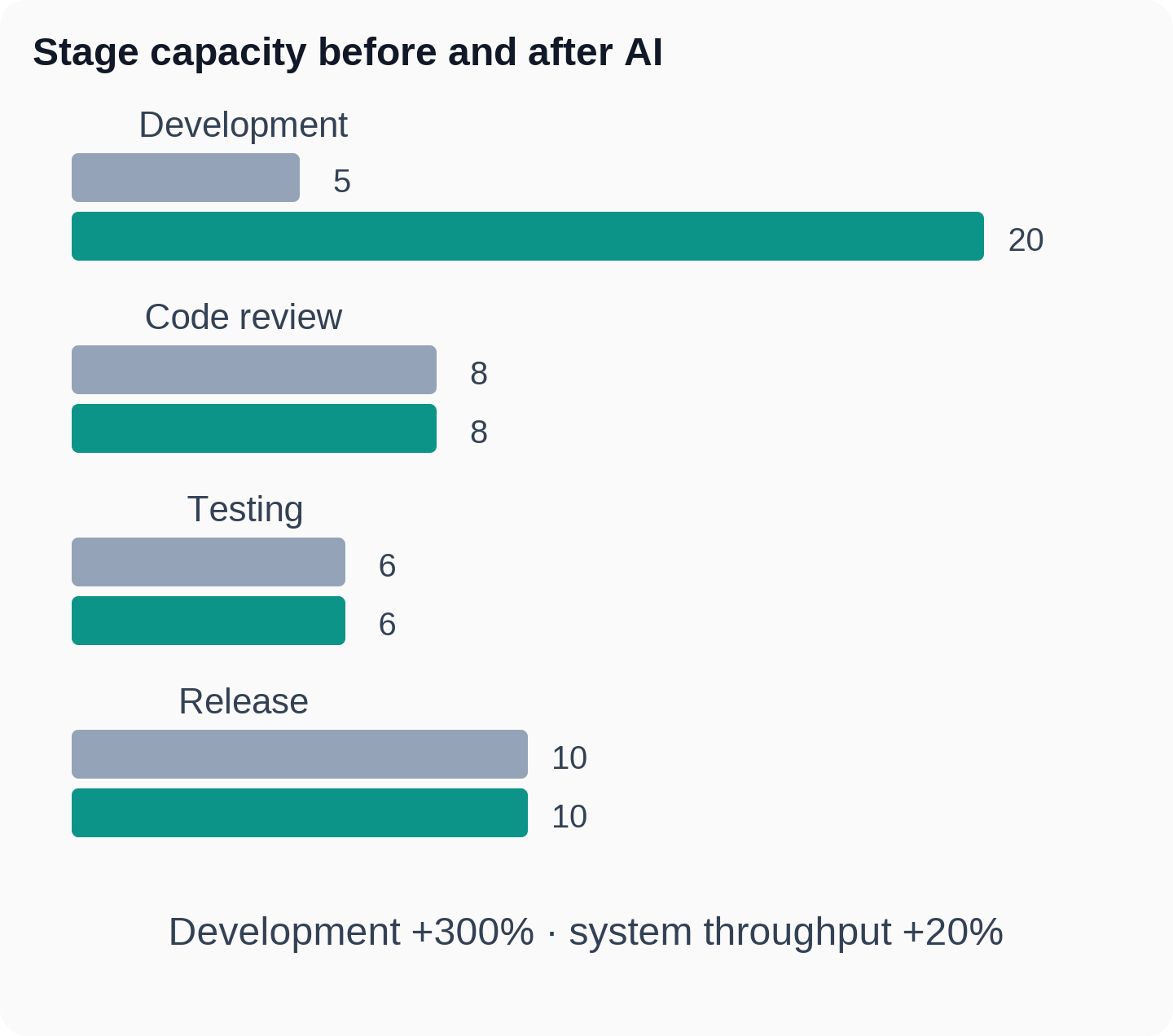
Figure: Hypothetical capacity values in standardized work items per workday, not data from a real project.
Testing remains the constraint in this simplified example. If development continues to produce work faster than downstream stages can verify it, the unverified queue grows without an equivalent increase in delivery.
The example assumes equal-sized work items, serial flow, no rework, and no other constraints. Real work varies; teams also need to account for concurrency, queues, waiting time, and rework.
The numbers distinguish three different ideas:
| Concept | What it measures |
|---|---|
| Local productivity | Output speed for one person or one stage |
| System throughput | The team’s ability to complete useful delivery |
| Quality outcome | Product reliability, risk control, and user value |
AI adds lasting value only when local productivity gains improve system throughput and quality outcomes.
Quality Gap: development speed and quality capacity diverge
Rosie Sherry described a team whose developers had completed their work on the first day of a sprint while the quality team could not keep up with the validation queue. She connected this to the Quality Gap discussed with Dan Faulkner, CEO of SmartBear, in an earlier conversation.
The Quality Gap is a mismatch between development output and the capacity to provide effective quality assurance.
The Quality Gap as AI accelerates work
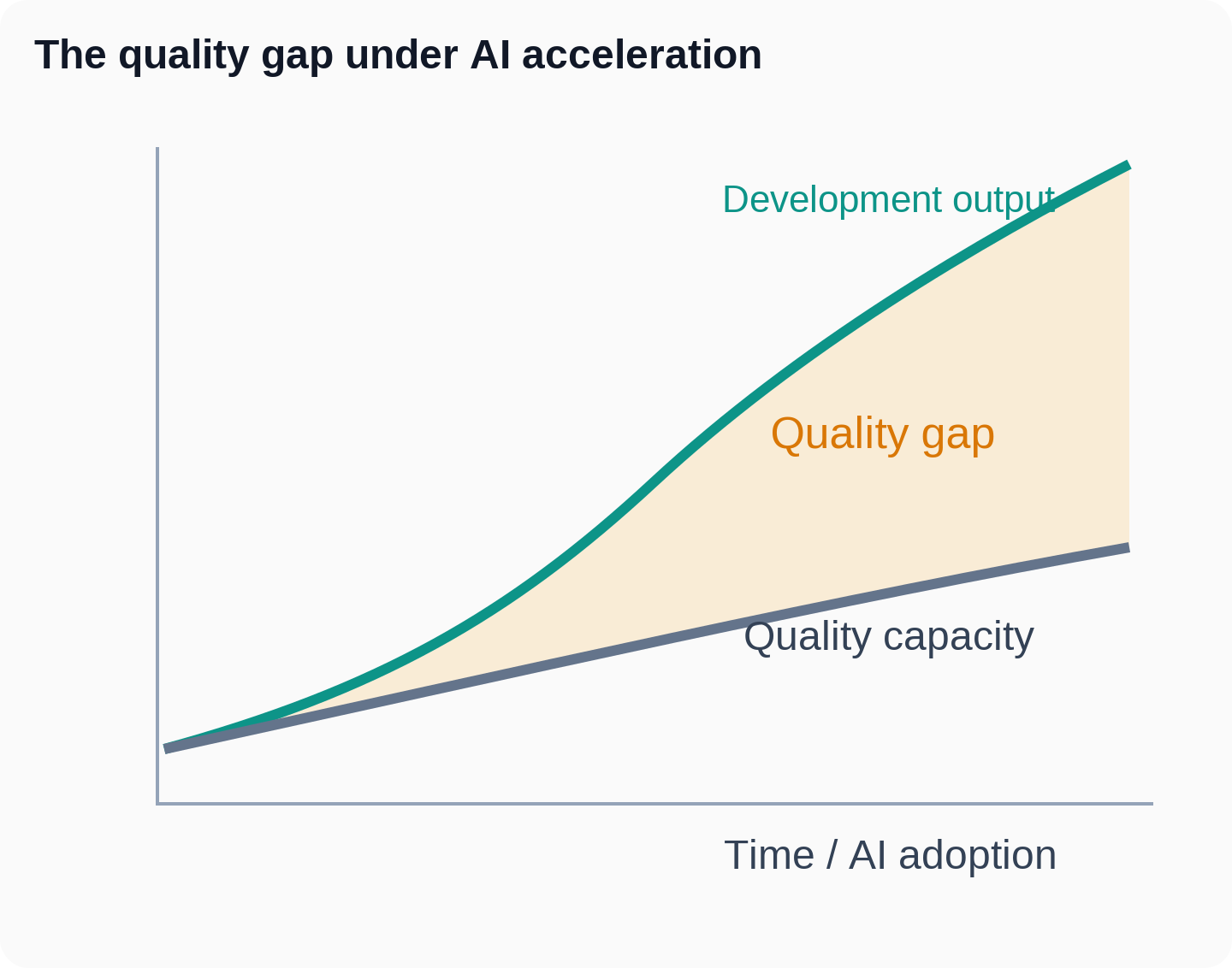
Figure: A conceptual illustration of mismatched capability growth, not industry statistics.
The gap covers more than a shortage of automated tests: it can involve requirements understanding, code review, test design, test data, environment management, defect analysis, and quality decisions. Asking QA to generate more tests with AI will not address every cause; if the constraint moves to test review, automation maintenance, or result analysis, more tests may make the queue worse. Teams need to improve the capability of the quality system, not only the speed at which it produces one type of artifact.
| What AI accelerates | Quality capability that may fall behind |
|---|---|
| Requirement drafting | Review and business confirmation |
| Technical-solution drafting | Architecture risk assessment |
| Code generation | Code understanding and review |
| Test generation | Test-effectiveness review |
| Defect fixes | Root-cause analysis and regression validation |
| Release preparation | Quality evidence and release decisions |
Customers are using AI too, and the feedback is changing
Gary described a team that had built a substantial automation suite and felt reasonably confident in its testing. After the product reached customers, those customers began using tools such as Claude to analyze it and send reports of issues they had found.
The team was caught off guard. AI is changing how users inspect products, describe problems, and send feedback.
A quality feedback loop in the AI era
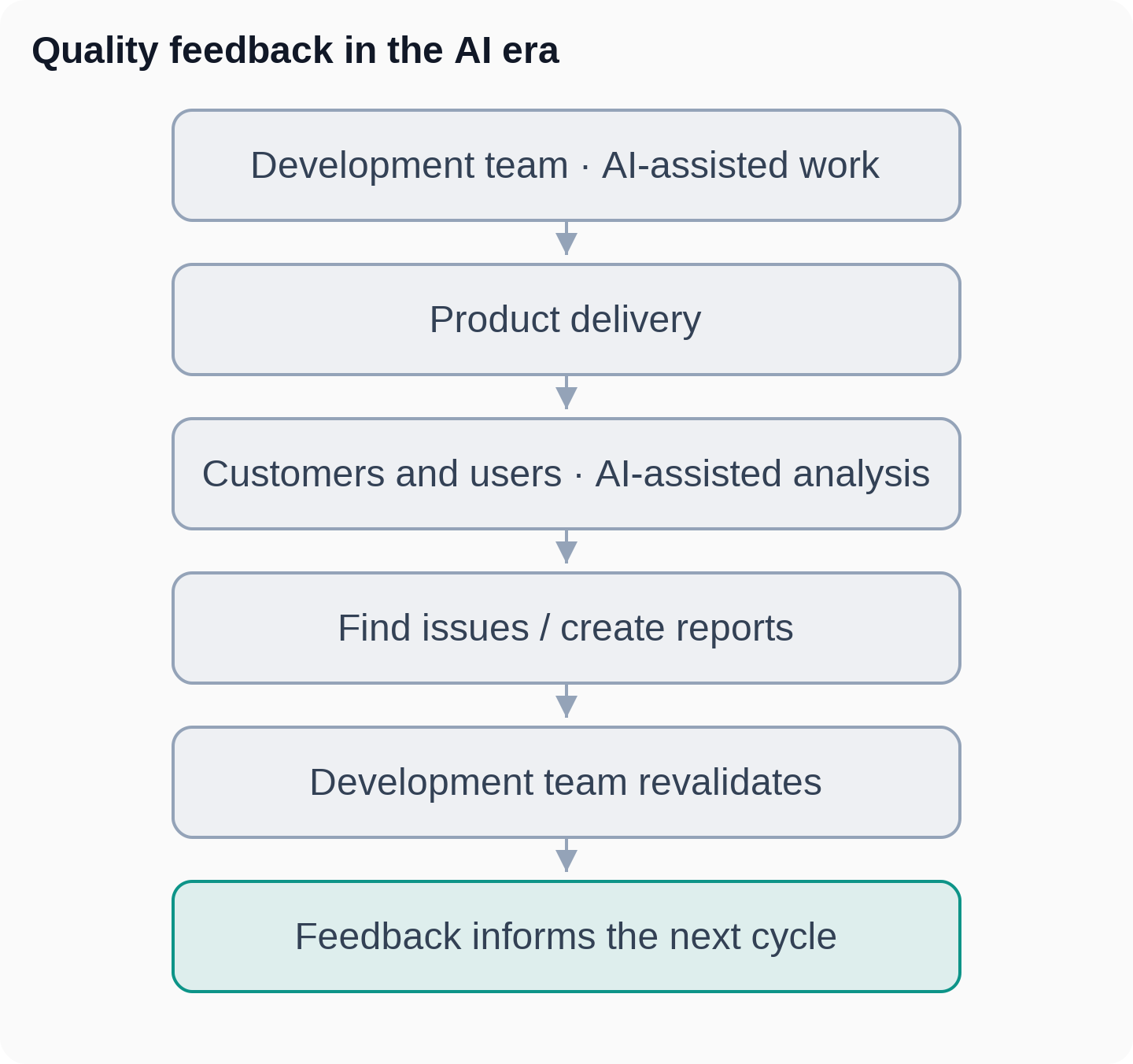
Figure: A feedback path derived from the session discussion.
Customer reports may include false positives, duplicates, or assumptions that do not hold. Every report still needs verification. The change is that product analysis that once required more time or technical knowledge may now be easier for customers to attempt.
Possible consequences for quality engineering include:
| Change | Possible quality-engineering response |
|---|---|
| Users can analyze product behavior quickly | Strengthen exploratory testing |
| Users can generate unusual inputs in bulk | Test boundaries and failure paths |
| Users can inspect public APIs and documentation | Strengthen API security and contract checks |
| Users can produce detailed issue reports | Improve triage and verification |
| Users can compare several products | Pay closer attention to real user experience |
| AI can produce incorrect reports | Use an evidence-based feedback process |
These are potential implications, not findings that every product has these problems. Gary’s point was that teams need to change how they think as customers gain new ways to investigate products. Quality teams can use AI before release to look for risks the team may not have considered.
Faster Silos: individual gains can isolate teams
AI tools can help one engineer complete work that once required several people, including technical design, code, automation frameworks, and documentation. That can be useful. Without collaboration and engineering governance, it can also create new problems.
Gary described an engineer who used AI to build a new test framework in a separate repository without coordinating enough with maintainers of the existing framework or other teams. The issue was not the engineer’s use of AI, and the new framework was not necessarily bad. The problem was creating a separate capability without coordination, which risked duplicated effort and team conflict.
Gary spoke with the engineer privately and raised mutual support, shared growth, and respect for one another’s expertise with the wider team. The discussion called this pattern Faster Silos.
Individual AI productivity and team productivity
It can show up in several parts of a project:
| AI use | Potential problem without coordination |
|---|---|
| Generate an automation framework | Multiple frameworks and higher maintenance cost |
| Generate test cases | Different roles repeat the same scenarios |
| Generate requirements documents | Business rules and acceptance criteria diverge |
| Create agents | Overlapping permissions, capabilities, and responsibilities |
| Create skills | Duplicated capabilities, version drift, inconsistent output |
| Generate quality reports | Teams use different definitions of quality |
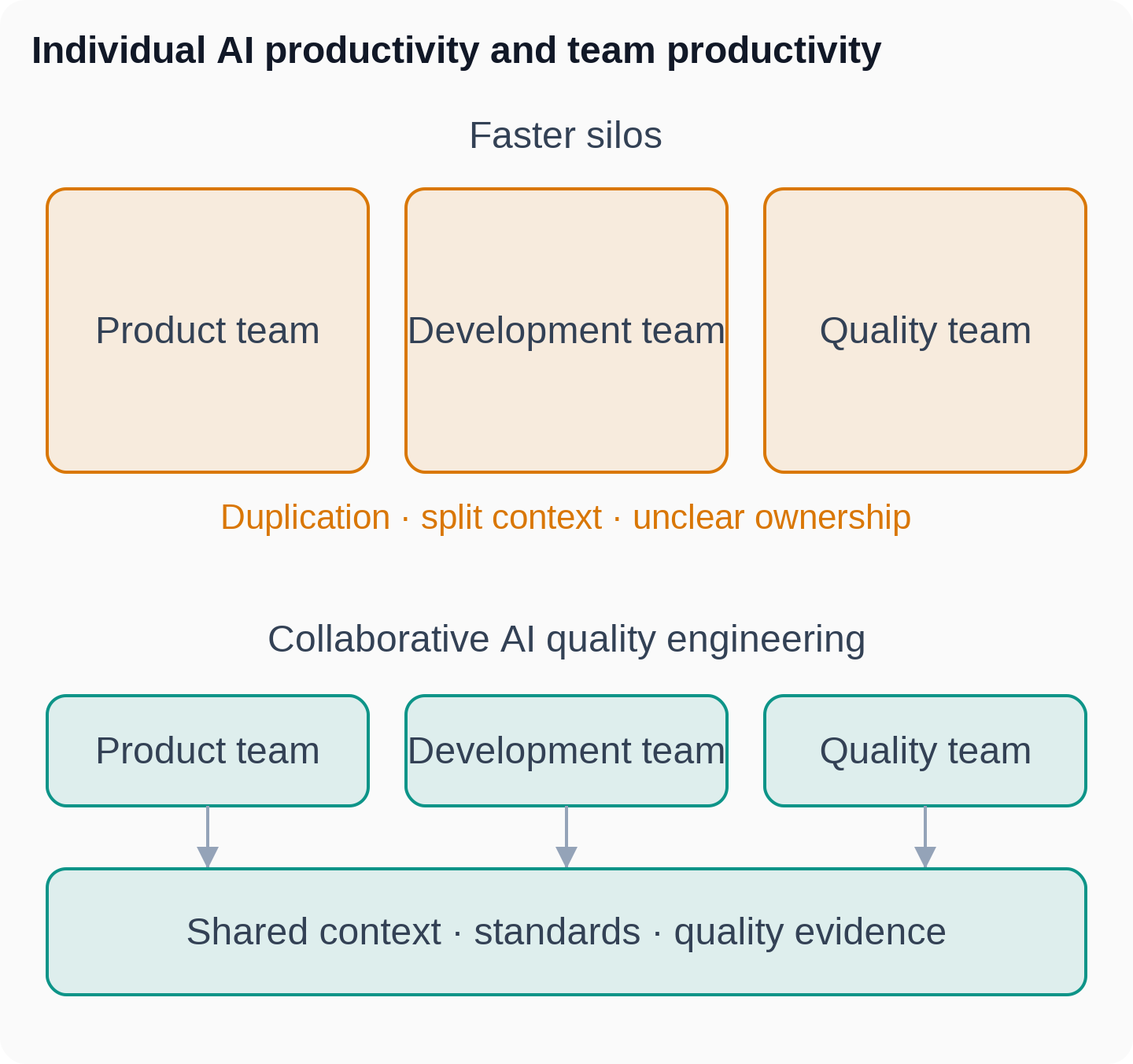
Figure: A conceptual comparison of individual speed and team collaboration.
Teams do not need to ban individual AI use or force everyone onto exactly the same tool. They can share engineering standards, a registry of capabilities, context-management practices, quality-evidence expectations, and coordination routines. Individuals can still run low-risk experiments; useful, validated practices can then become shared team capability.
That is an organizational concern for AI Native Quality Engineering.
What gets measured gets optimized
Shawn pointed out that people tend to optimize for the measures used to assess them, sometimes at the expense of goals that are not measured. If token usage becomes the main indicator of AI adoption, for example, people may increase token usage instead of solving problems more effectively.
This resembles Goodhart’s law: when a measure becomes a target, it can stop being a useful measure.
AI productivity measures that can mislead
| Measure | Behavior it may encourage | Outcome worth watching |
|---|---|---|
| Token consumption | Unnecessary AI calls | Useful value per unit cost |
| Lines of AI-generated code | Redundant code | Maintainability and correctness |
| Number of generated test cases | Duplicate scenarios | Coverage of important risks |
| AI-tool usage frequency | Using AI for its own sake | Actual improvement in work |
| Automated test pass rate | Weaker assertions or ignored failures | Test effectiveness and trustworthiness |
| Number of AI tasks completed | Chasing easy tasks | Ability to solve difficult problems |
| Release frequency | Compressing necessary validation | Stable delivery of useful value |
These measures can still be useful for specific purposes. Token use can help manage cost, code volume can show how much AI is being used, and a test pass rate can signal execution results. The problem is treating these process signals as direct measures of productivity or quality.
Establish balanced AI quality measures
This article extends the discussion with a quality-value model that considers delivery efficiency, product quality, engineering cost, and team capability. It is a practical framework proposed here, not a formal model from the session.
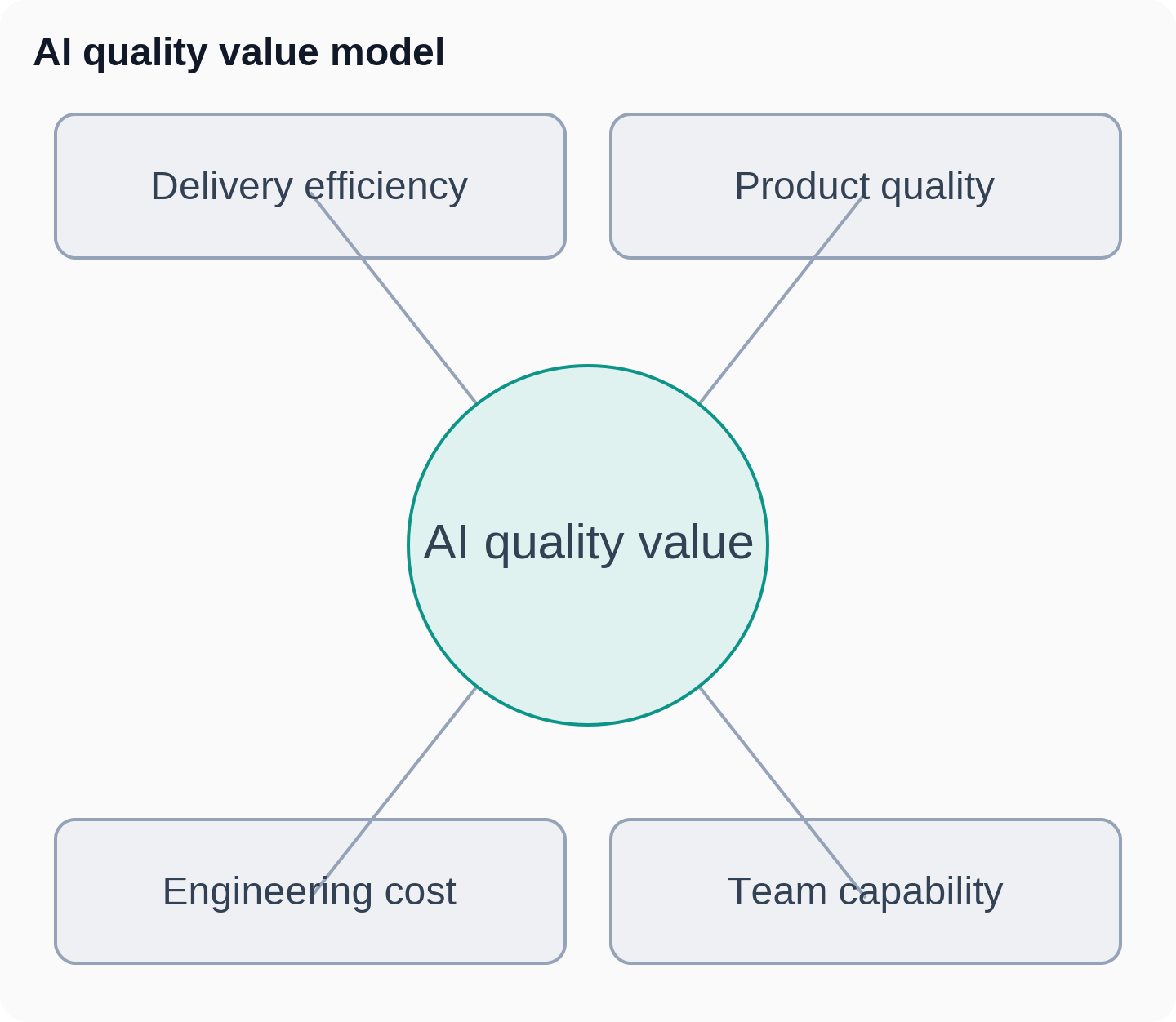
Figure: A four-part AI quality value model proposed in this article. The table expands it into six measurement areas.
| Dimension | Possible measures |
|---|---|
| Delivery efficiency | Lead time, delivery throughput, task waiting time |
| Product quality | Escaped defects, coverage of critical risks, production incidents |
| Engineering cost | Time spent reviewing AI output, rework time, maintenance cost |
| Test effectiveness | Useful assertions, mutation-testing results, test stability |
| Team capability | Reuse, knowledge sharing, cross-role collaboration |
| AI trustworthiness | Output error rate, evidence completeness, human corrections |
Interpret these measures in the context of the product, risk level, and historical baseline. Do not turn them into simple individual rankings. If a team tracks output growth but not review effort, rework, risk, or long-term maintenance, it sees only the visible part of AI productivity.
Use AI to go deeper, not only faster
Neil asked why people talk so much about using AI to speed up work, and so little about using it to do more thorough work. Gary emphasized balancing cost, quality, and time; focusing on only one can hurt the other two.
From faster to deeper
| Quality activity | Faster with AI | Deeper with AI |
|---|---|---|
| Requirements analysis | Summarize a requirement | Find conflicting rules, hidden assumptions, and business risks |
| Test design | Generate many cases | Explore combinations, state changes, and coverage gaps |
| Automation | Draft scripts quickly | Check assertions, isolation, and maintainability |
| Exploratory testing | Create a checklist | Form risk hypotheses and adapt the exploration |
| Defect analysis | Draft a bug report | Find related defects, root causes, and systemic issues |
| Performance testing | Draft a test script | Analyze capacity, resource contention, and bottlenecks |
| Security testing | Generate security scenarios | Examine attack surfaces, trust boundaries, and business abuse |
| Release review | Draft a quality report | Find evidence gaps, residual risk, and uncertainty in decisions |
| Continuous improvement | Summarize a retrospective | Analyze trends, process friction, and system constraints |
Faster and deeper work can support each other. AI can reduce repetitive tasks and free time for more valuable quality work. What matters is where that time goes.
If generating test cases drops from three hours to half an hour, using the remaining time only to generate still more cases keeps the team focused on artifact volume. Using it to analyze requirement risks, explore the product, test across systems, or improve the quality strategy may produce a different benefit.
Practice: use AI to support exploratory testing
Consider a coupon feature in an online store. A basic AI prompt may produce cases for claiming and using a coupon, expiration, minimum order amounts, and eligible products. An exploratory-testing partner can help examine the conditions around those flows.
An AI-supported exploratory-testing loop
The cycle below is a practical extension in this article. It keeps people responsible for choosing what to explore, collecting evidence, and deciding whether a risk is real.
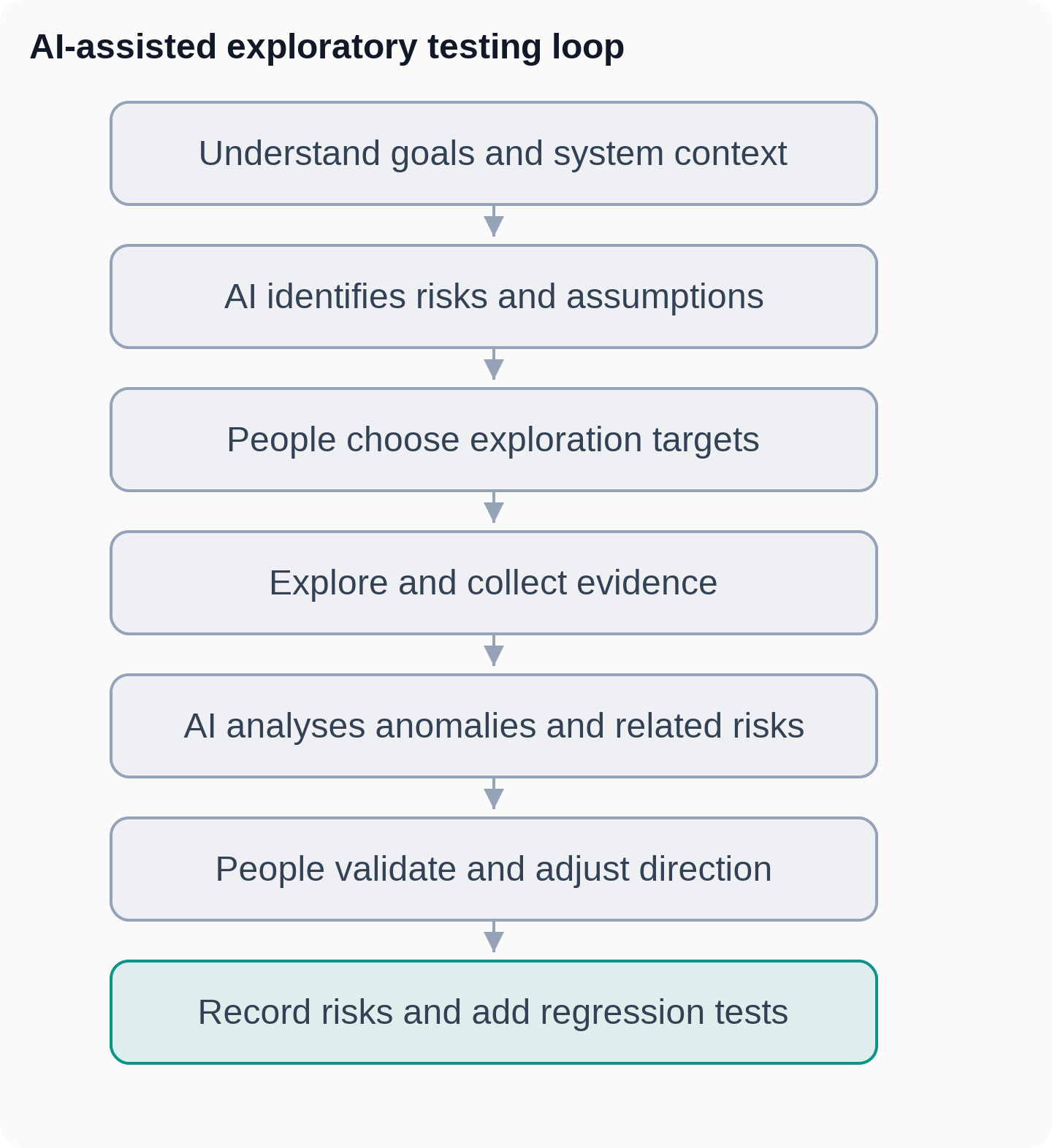
Figure: An exploratory-testing practice proposed in this article.
AI can help raise questions across several risk areas:
| Exploration area | Questions AI could help raise |
|---|---|
| State transitions | What should happen to a coupon after an order is cancelled or refunded? |
| Concurrent operations | What happens if two orders try to use the same coupon at once? |
| Time boundaries | What should happen if the coupon expires while payment is in progress? |
| Combined rules | How should a coupon combine with a spend threshold or membership discount? |
| System dependencies | How should order and payment recover if the coupon service times out? |
| Data consistency | How should the system compensate if a coupon is used but the order is not created? |
| Business abuse | Could someone claim or use a coupon more than once, or across accounts? |
| User experience | Can users understand why a coupon is unavailable? |
| Observability | Can logs show the full path when a coupon behaves unexpectedly? |
These questions are starting points, not evidence that the product has those defects. QA still needs to compare them with business rules, system design, and test evidence, then decide what to verify.
A prompt for an exploratory-testing partner
The following prompt is an example proposed in this article. It asks AI to distinguish evidence from assumptions and to avoid inventing execution results.
You are an AI partner helping a quality engineer with exploratory testing.

Your goal is not to generate a large number of test cases quickly. Help me understand the business more deeply, identify unknown risks, challenge assumptions, and find gaps in the current test strategy.

Base your analysis on the requirements, business rules, system architecture, API contracts, historical defects, and existing test results that I provide.

Look for:
- Ambiguous or conflicting requirements and unconfirmed assumptions.
- Business state transitions and dependencies across systems.
- Unexpected behavior that may emerge when conditions combine.
- Concurrency, timing, data consistency, and recovery from failures.
- Security, performance, accessibility, and maintainability risks.
- Potential risks outside the current test coverage.
- Other systemic problems that may be related to a reported defect.

Return:
| Risk hypothesis | Evidence for the analysis | Potential impact | Exploration direction | Evidence needed | Priority |
| --- | --- | --- | --- | --- | --- |

Separate confirmed facts, reasonable inferences, and hypotheses that still need validation.
Do not describe speculation as a real defect. Do not invent test execution results or duplicate scenarios just to increase test volume.
If the available information is insufficient, ask what needs to be confirmed.
When I provide actual test results, analyze the new risks and help adjust the next round of exploration.
The prompt could be standardized as an exploratory-testing Skill so its analysis steps, output structure, and evidence expectations are repeatable. Whether the team uses a prompt, a Skill, or an Agent, the aim is to improve analysis and verification, not just produce more test artifacts.
Accessibility and testability reinforce each other
Shawn had found accessibility hard to advocate for directly. When AI-generated tests started becoming flaky, framing semantic markup as a testability concern made the issue easier to discuss: clear roles and names help tests locate controls in ways that reflect user behavior.
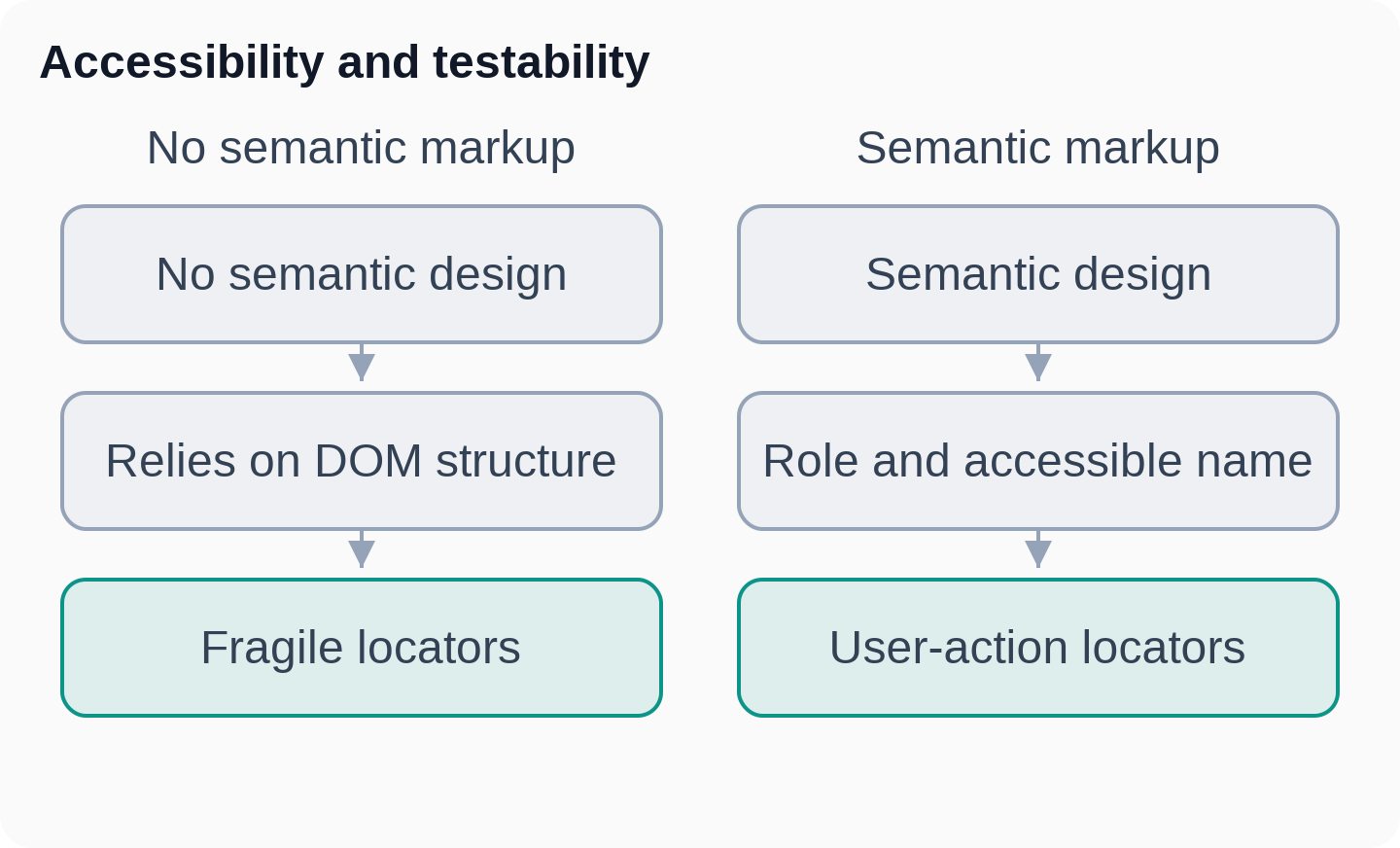
Figure: A conceptual comparison of non-semantic and semantic locators.
A locator that depends on page structure can be fragile:
await page
  .locator('div.checkout > div:nth-child(3)')
  .click();
With suitable semantics and an accessible name, a test can describe the user’s action more directly:
await page
  .getByRole("button", { name: "Place order" })
  .click();
This can make tests easier to read and maintain, and it can help assistive technologies understand page elements. It will not fix every flaky test or prove full accessibility conformance. Async behavior, concurrency, test data, and environment problems still need separate investigation.
The example also shows how quality attributes can support one another:
| Quality attribute | Related value |
|---|---|
| Accessibility | Testability and user experience |
| Testability | Automation stability and diagnosis |
| Observability | Diagnosability and recovery |
| Maintainability | Change speed and test maintenance |
| Reliability | User trust and business continuity |
| Security | Data protection and risk control |
Quality engineers need to understand these relationships and choose language that makes sense to the people they are trying to reach.
Quality engineering in the AI era needs systems thinking
Bugberg, Boach, the Quality Gap, and Faster Silos all invite a systems view of AI’s effects.
- Focusing on how quickly one person completes a task can hide collaboration problems.
- Focusing on code-generation speed can hide review and validation capacity.
- Focusing on test-case counts can hide whether the tests are useful.
- Focusing only on defects already found can hide risks still within the system.
From local AI gains to system-wide quality engineering
The workflow below is a model proposed in this article. AI participates across the development lifecycle, while quality engineering keeps the work aligned with shared business goals and supported by validation, evidence, and feedback.
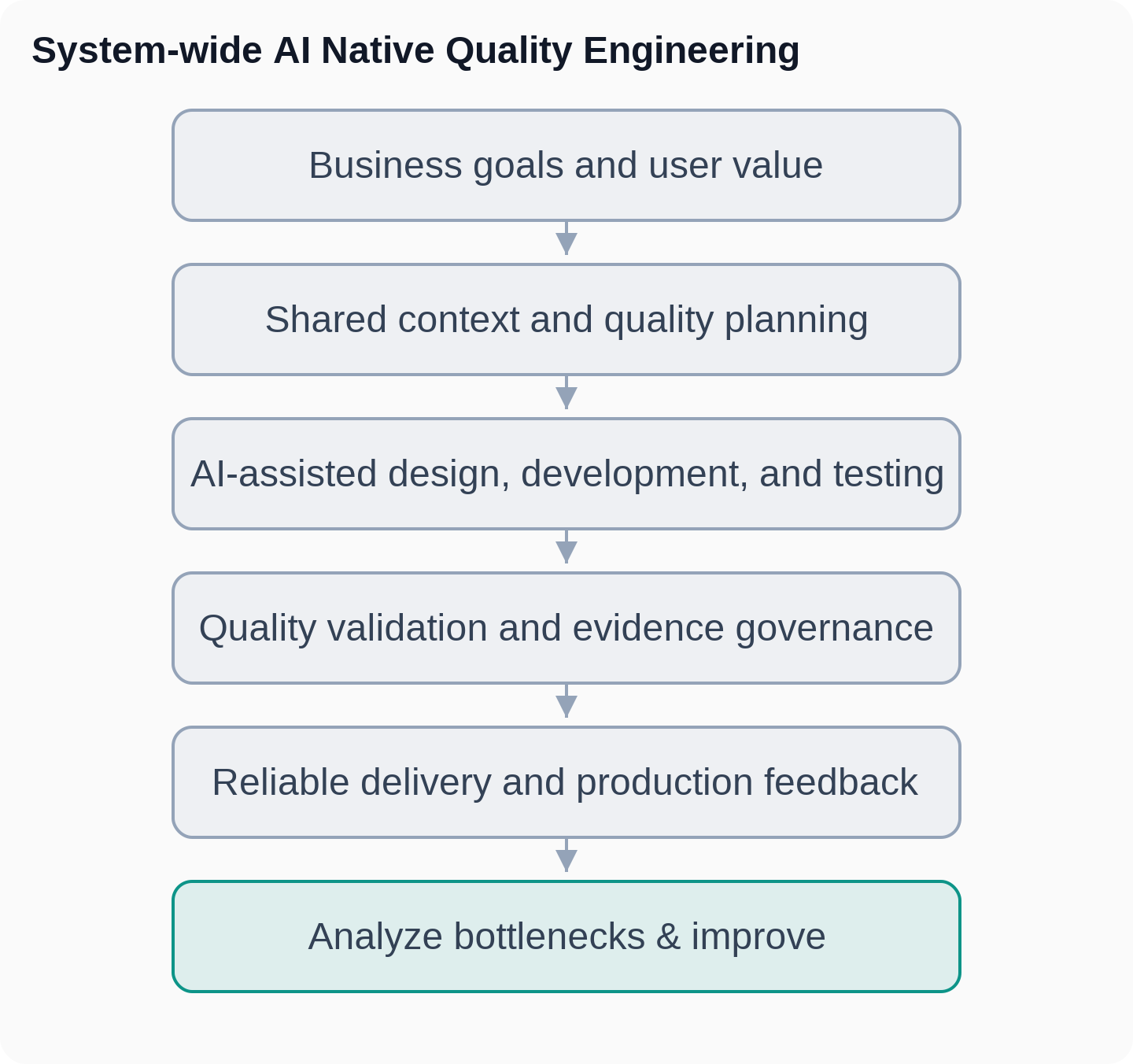
Figure: A system-wide working model proposed in this article.
Use Bugberg to examine AI-related quality problems
A team can use Bugberg as a quality-review exercise after introducing AI. It can discuss visible benefits, hidden costs and risks, assumptions behind those risks, and the evidence that would confirm or disprove them.
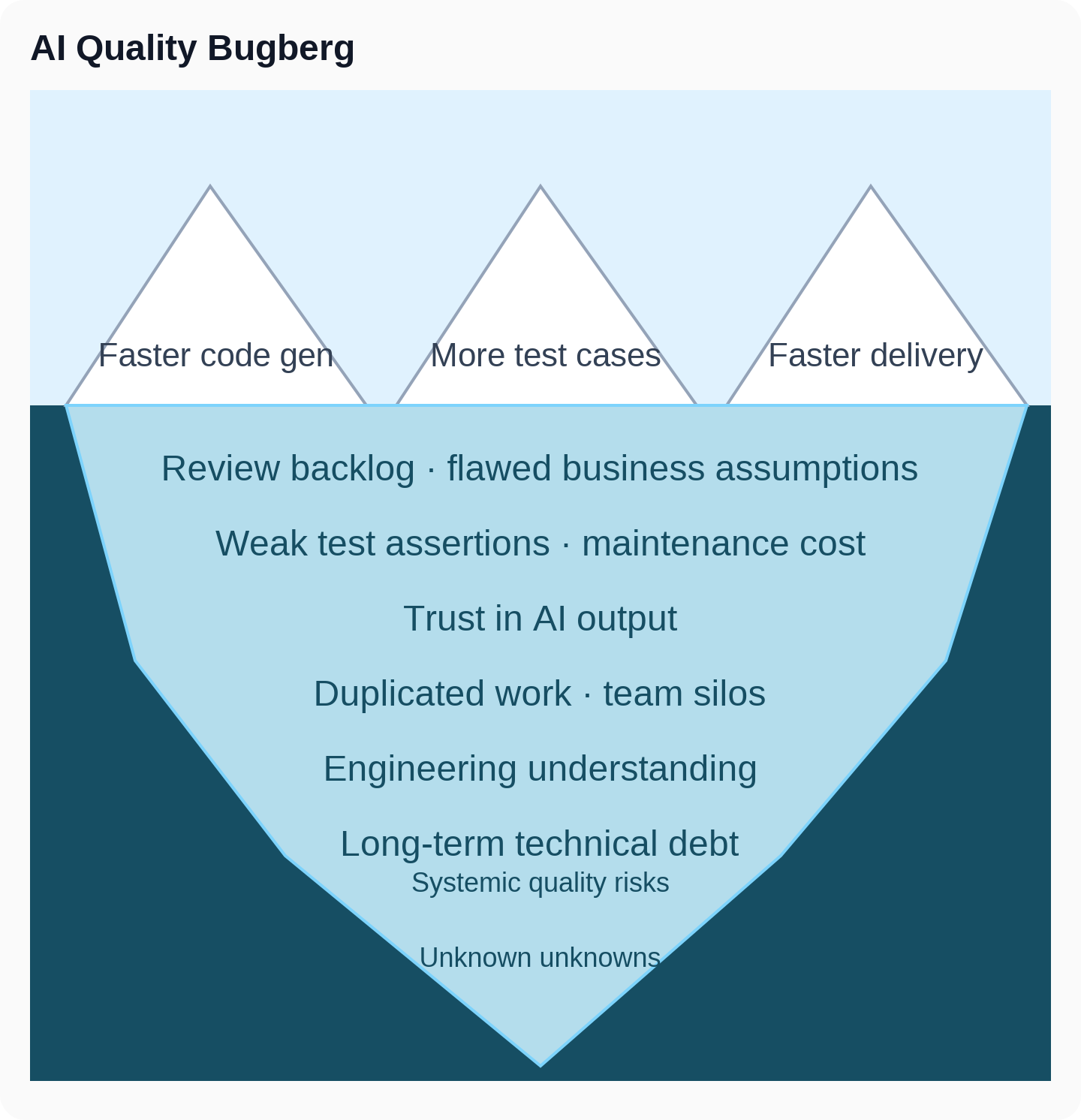
Figure: A practical extension of the community Bugberg idea, not a formal model from the session.
A team workshop
| Stage | Activity | Expected output |
|---|---|---|
| Observe the current state | Collect the team’s current AI use cases | Map of AI use |
| Map the surface | Discuss benefits already observed | List of visible value |
| Map below the surface | Discuss hidden costs, risks, and friction | Map of possible issues |
| Analyze relationships | Identify dependencies and causal hypotheses | Analysis of systemic risks |
| Check the evidence | Use real data to verify whether a problem exists | Verifiable quality evidence |
| Run an improvement experiment | Choose one important constraint and try a small change | Improvement proposal and results |
| Review periodically | Compare Bugbergs from different periods | Record of changing quality priorities |
For example, a team may find that AI generates automation tests quickly while the cost of maintaining those tests has risen. Further analysis might show that the model is not the primary problem. The team may lack shared framework standards, reusable components, or a review process for AI-generated tests.
In that case, improving the test-engineering system may matter more than finding a stronger AI model.
Keep the people and learning beneath the surface in view
Simon’s Bugberg for quality professionals put creativity, critical thinking, and risk awareness above the water. Care, listening, empathy, and systems thinking sat below it. He placed Joy in the sun as a source of motivation to keep doing the work.
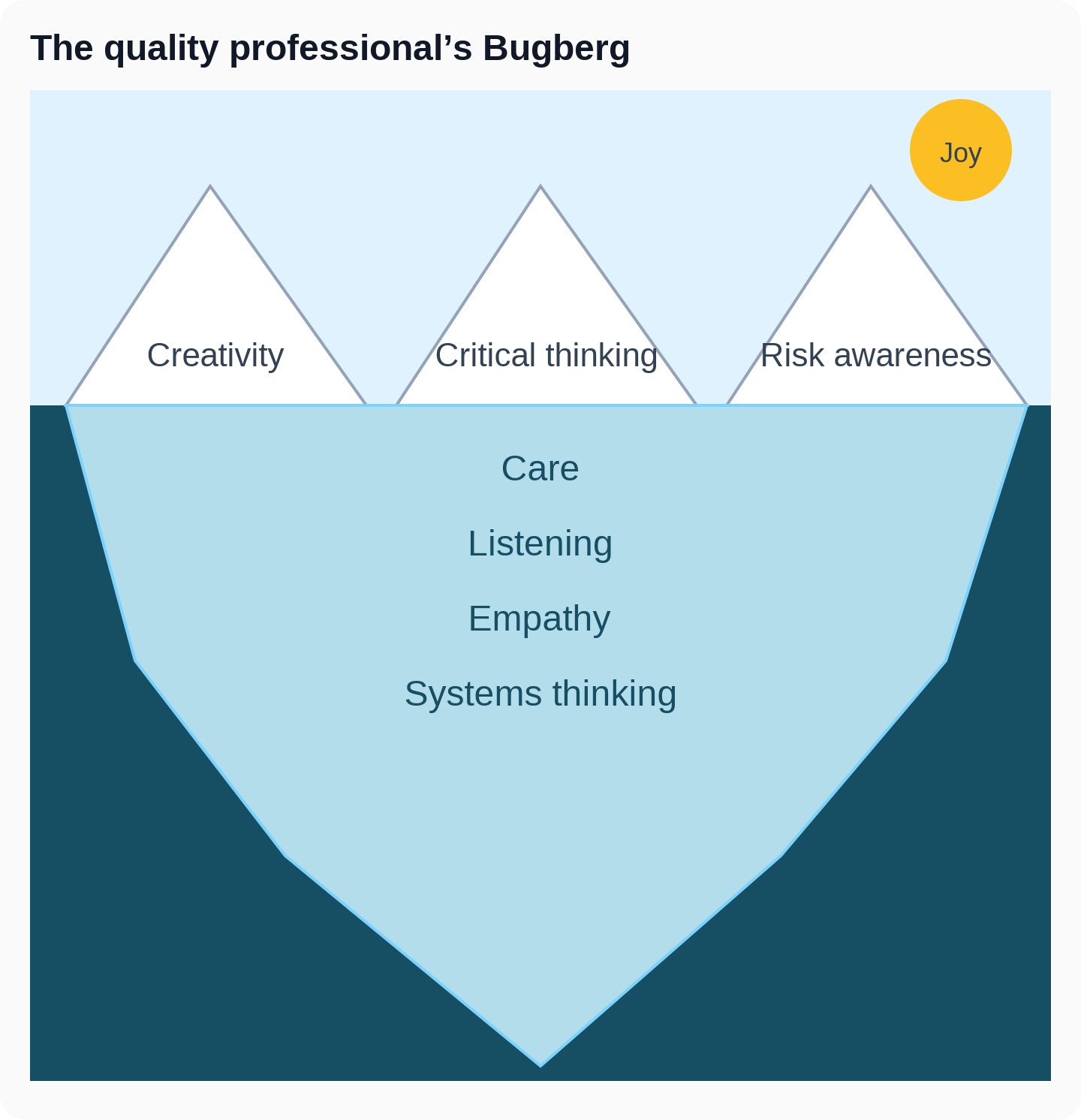
Figure: Redrawn from Simon Tomes’s description in the session.
Career growth can look like learning more AI tools, frameworks, and automation techniques. Quality work still depends on people working together. Understanding why a product manager made a decision, why a developer chose a design, why a user is confused, or why a team struggles to adopt a practice calls for listening, communication, empathy, and systems thinking.
The session also discussed in-person community events and “hidden learning.” Learning does not happen only through courses, certificates, and technical documents. Everyday conversations, team discussions, peer reviews, watching someone test, and joining a community can all build professional capability.
AI can make information easier to find. Collaboration, feedback from practice, and experience with other people still shape how that knowledge becomes useful.
Reflection questions
- Am I taking initiative, following relevant practice, and continuing to learn?
- Do I check and question AI-generated work instead of trusting it automatically?
- What skill am I building, and what might I need to learn next?
- If I were hiring, would I hire the professional I am today?
Frequently asked questions
Does AI always move a quality bottleneck?
No. If requirements, development, review, testing, and release improve together, and the team pays attention to system throughput, AI can improve overall efficiency. Bottleneck shifting is more likely when one capability grows quickly while other stages do not adapt.
Should QA generate more tests with AI to close the Quality Gap?
AI can help, but increasing test volume should not be the only response. First find the constraint. If the problem is unclear requirements, unstable environments, missing test data, or review queues, more tests may add to the backlog.
How can a team tell whether AI is helping it do better work, not only faster work?
Compare delivery time, rework cost, coverage of important risks, escaped defects, test effectiveness, and maintenance cost before and after adoption. If output grows while rework and maintenance rise too, investigate the actual benefit.
Can AI replace exploratory testing?
AI can support risk analysis, scenario exploration, information retrieval, anomaly analysis, and some test execution. Exploratory testing also involves adapting to what happens, applying business judgment, evaluating user experience, examining evidence, and understanding unknown problems. AI is more useful as a testing partner than as a full replacement.
How can teams avoid Faster Silos?
Share engineering goals, context, reusable capabilities, quality-evidence standards, and coordination routines. Allow people to run low-risk experiments; when an experiment is validated, use team review to make the useful parts available to others.
Can Bugberg replace root-cause analysis?
No. Bugberg helps a team build a shared view of visible symptoms and possible hidden causes. It does not replace formal root-cause analysis, risk assessment, or evidence-based verification.
Final thoughts
AI changes how software is produced and how quality problems surface. Code and test artifacts can arrive faster, while review, validation, collaboration, and trust in AI output become new pressure points. AI can help teams find risks and can also leave some problems hidden.
Bugberg, Boach, the Quality Gap, and Faster Silos raise one question: has the team verified that local AI gains improve delivery and product quality?
For quality engineers, the useful questions go beyond how to generate test cases, automation scripts, and reports more quickly:
- Do we understand the system more deeply?
- Are we finding risks we used to miss?
- Are we reducing waste across the whole system?
- Are we delivering a better product?
Use AI to improve how teams understand problems, test assumptions, and assure quality, while also making existing work faster.
References
Primary sources
Ministry of Testing, “Boach, Bugbergs and bottlenecks: going deeper with AI, not just faster”: https://www.ministryoftesting.com/media-sessions/boach-bugbergs-and-bottlenecks-going-deeper-with-ai-not-just-faster
Ministry of Testing, “The Bugberg challenge: show us what lurks beneath your bugs”: https://www.ministryoftesting.com/news/the-bugberg-challenge-show-us-what-lurks-beneath-your-bugs
Ministry of Testing, “Quality Gap” glossary: https://www.ministryoftesting.com/glossary/quality-gap
Further reading
- From Test Management to Quality Management Systems: https://www.ministryoftesting.com/media-sessions/from-test-management-to-quality-management-systems
- From Script Writer to Test Strategist: https://www.ministryoftesting.com/moments/from-script-writer-to-test-strategist
- Where AI Actually Helps in Testing and Where It Just Looks Like It Does: https://www.ministryoftesting.com/moments/where-ai-actually-helps-in-testing-and-where-it-just-looks-like-it-does
- Ideas on How to Succeed as a Software Tester: https://www.ministryoftesting.com/insights/ideas-on-how-to-succeed-as-a-software-tester
- Awesome QA Skills: https://github.com/naodeng/awesome-qa-skills
More Resources
- Personal website: https://inaodeng.com/en/
- AI Test Auditor: https://github.com/AI-Native-QA-Lab/ai-test-auditor
- DeepSeek QA Workbench: https://github.com/naodeng/dsh-qa
- QA Skills: https://inaodeng.com/en/qaskills/
- Testing Wiki: https://inaodeng.com/en/wiki/
- AI Wiki: https://inaodeng.com/en/AIWiki/