
A Skill edit can change more than wording: it may alter activation, required inputs, output fields, constraints, or failure handling. Skill Change Verification starts from the actual diff, chooses checks for the affected behavior, and reports exactly what the evidence supports. It does not turn a configuration check into a runtime claim.
Classify the change before choosing a check
Use the changed files and their consumers to decide what to verify. A broad test run does not replace checking the paths touched by the diff.
| Changed surface | Minimum evidence to consider | Claim that evidence can support |
|---|---|---|
| Entry point, metadata, links, or layout | Relevant static and structural checks, plus a standalone copy where applicable | The package shape and referenced resources are valid; behavior was not run |
| Prompt, procedure, or output contract | Representative success, missing-input, and boundary cases with actual runs and judge results | Only the selected cases, versions, host, and environment were exercised |
| Parser, generator, or installer | A regression for the original fault, a valid control, and execution with the target format or tool | Only the tested paths worked |
| Release recommendation | Change evidence, version, residual risks, and an authorized decision record | The recommendation and formal approval are separate facts |
Keep evidence levels distinct: Static checks files and frontmatter; Structural checks pairing, indexes, and Eval shape; Configuration checks setup such as skill-up validate; Evaluation records an actual skill-up run, selected cases, metadata, and judge results; Runtime records the Skill or Prompt behavior in its target host; Human review covers meaning and risk. A successful configuration command alone does not prove Evaluation or Runtime.
Example: changing a Skill description
Suppose a description change is intended to make a Skill activate for API compatibility reviews. First record the old and new package versions and the actual diff. Then test a small fixed request set: an in-scope compatibility review, a neighboring API task, and an unrelated request. Where the host exposes Skill selection, retain that evidence alongside the produced output. Include a missing-input case if the revised instructions depend on a specification or version.
If only frontmatter and skill-up validate were checked, report the configuration result and mark Evaluation and Runtime NOT_RUN. Do not say that activation improved, that the Skill is reliable, or that the change is production-ready without the corresponding runs and human decision.
When the output contract changes, use normal, missing-input, and conflicting-source cases. Check that the new version still emits required fields, preserves unknown states, and does not turn competing sources into one certain answer. Add a neighboring but out-of-scope request to check the trigger boundary. Compare old and new versions on the same cases so a new behavior does not hide a removed constraint.
Write a report another person can audit
Preserve the selected commands, versions, environment, selected Eval cases, raw outputs, and judge status. For every omitted check, give the reason and the risk it leaves open. A timeout, missing authentication, filtered-out case, or failed judge is not a full-suite pass.
# Verification report
## Change classification
## Checks run
| Command | Evidence level | Result |
## Checks not run
| Item | Reason | Risk |
## Claims supported
## Claims not supported
## Residual risks
A NOT_RUN entry is a useful boundary: it tells the next reviewer what remains unknown instead of hiding the gap behind a green configuration check.
Hand off to the right next step
Use Skill Prose Contract Review: https://inaodeng.com/en/qaskills/skill-prose-review/ first when the change itself is unclear or contradictory. Use Process Prose Trimming: https://inaodeng.com/en/qaskills/skill-prose-trim/ when the requested work is removal of process residue. After an authorized edit, Skill Change Verification checks whether the selected contract and examples still hold.
Install this Skill with:
npx skills add https://github.com/naodeng/awesome-qa-skills/tree/main/skills/en/skill-engineering/skill-change-verificationAfter installation, provide the actual diff, Skill version, target host, available checks, and authorization boundary. For example:
Use skill-change-verification to review this change: [diff or changed-file list].
Old and new versions: [versions]. Target host: [host and environment].
Available checks and selected cases: [commands, Eval cases, runtime runs].
Classify evidence by level, identify unrun checks and residual risk, and state exactly which claims the evidence supports. Do not report behavior as verified unless the relevant run was performed.
Best practices
- Choose checks from the changed behavior and its consumers, not from file count or a broad test run alone.
- Compare the old and new versions on the same representative inputs, including normal, missing-input, boundary, and out-of-scope cases when they apply.
- Retain the exact versions, host, environment, selected cases, outputs, and judge status. Mark omitted evaluation or runtime checks
NOT_RUNwith the risk they leave open. - If results will be consumed by tooling, confirm the schema, enums, required fields, and evidence sources before the run.
First use: verify one changed behavior
- Read the actual diff and name the behavior or contract it could change.
- Pick a small fixed set of requests that exercises the expected behavior and one relevant boundary.
- Run the checks that are available, then report the evidence level, unrun work, and limits of the claim. If a command is unknown, mark it for confirmation instead of guessing.
Keep Skill changes in the quality loop
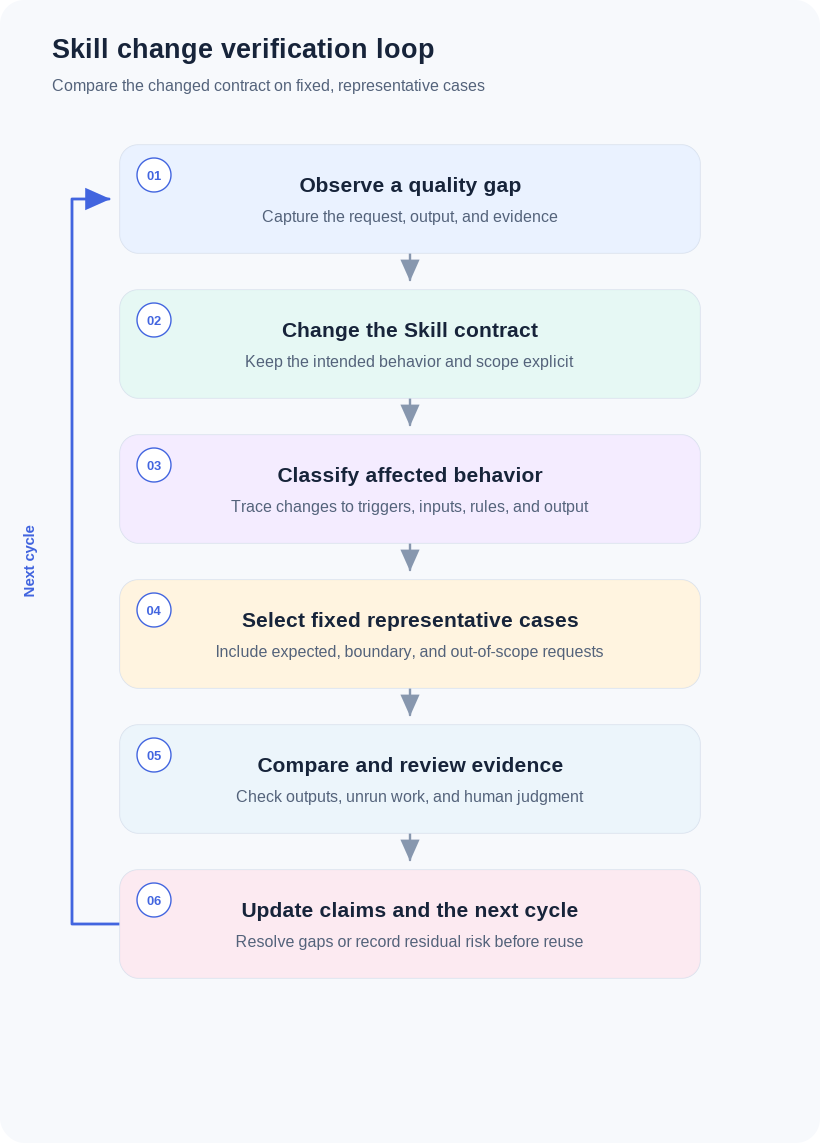
When a change affects a test-generation Skill, check whether its generated cases still map to requirements and boundaries. Review them, run the relevant accepted cases, and compare the evidence before and after the edit. Generation or a configuration check alone does not show that test behavior improved.
FAQ
Does a successful configuration check prove the Skill behaves correctly?
No. Configuration evidence shows only that the checked setup passed. Evaluation or runtime claims need actual runs with recorded cases, versions, host, outputs, and results.
Does a small wording change need no behavior review?
Not automatically. Check whether the wording can affect activation, required inputs, output fields, permissions, or failure handling, then choose checks that cover the changed surface.
What if I cannot run the target host?
Report the static, structural, or configuration evidence you actually collected. Mark Evaluation and Runtime NOT_RUN, describe the open risk, and leave host-behavior claims unsupported.
References
- Skill Change Verification source, prompt, and Eval files: https://github.com/naodeng/awesome-qa-skills/tree/main/skills/en/skill-engineering/skill-change-verification
- Skill Change Verification directory on this site: https://inaodeng.com/en/qaskills/skill-change-verification/
More Resources
- Personal website: https://inaodeng.com/en/
- AI-generated test detection project: https://github.com/AI-Native-QA-Lab/ai-test-auditor
- DeepSeek QA Workbench: https://github.com/naodeng/dsh-qa
- More AI testing skills: https://inaodeng.com/en/qaskills/
- More testing wiki: https://inaodeng.com/en/wiki/
- More AI Wiki: https://inaodeng.com/en/AIWiki/