
A useful quality dashboard lets a named audience make a specific decision and trace the displayed signal back to evidence. The Quality Dashboard Design Skill reviews that contract: who needs the view, what they must decide, and what each panel can support.
When this Skill helps
Use it to design or review dashboard audiences, decision questions, panels, drill-downs, freshness, and alert boundaries. It can assess supplied plans, results, and metrics, then turn gaps into validation work. It cannot invent metric values, thresholds, root causes, or release approval.
Review workflow
For each audience, write down the decision and the time window. Give every proposed metric a definition, source, numerator and denominator, refresh time, and limitations. Then specify what the viewer can do when a value changes.
| Dashboard element | Contract to make explicit |
|---|---|
| Audience and decision | Who acts, and what choice does the panel inform? |
| Metric | Definition, unit, numerator, denominator, source, and population |
| Freshness | Last refresh, delay, sampling, and stale-data behavior |
| Drill-down | Link to the run, obligation, defect, or incident evidence |
| Alert boundary | Trigger, owner, action, and escalation or stop condition |
Represent missing values honestly. Zero, null, NOT_RUN, BLOCKED, and stale data mean different things; never substitute zero or a previous green value for unavailable evidence. An overall rate must not hide a small high-risk group or a P0 blocker.
Check that the view preserves state
Turn the dashboard plan into a small set of reviewable display scenarios. A design review can check whether the rules are specified; evidence from the actual environment and run is still needed to show that the interface and data pipeline follow them.
| Scenario | How the panel should respond | Evidence to inspect |
|---|---|---|
| Denominator is missing or zero | Show a not-computable or no-data state, not an assumed 0% | Denominator definition, null handling, and time window |
| Source is past its freshness limit | Show the last update and stale state instead of reusing a previous green result | Refresh time, delay rule, and owner for the staleness threshold |
| Overall result is healthy but a high-risk group is not | Keep the segment and its scope visible; do not average it away in the summary | Segment definition, sample-size limits, and alert rule |
| Drill-down link is broken | Mark the evidence trace as missing and identify the responsible source | Correlation key between panel and run, defect, or incident record |
| Alert fires | Name the owner, response, escalation path, and resolution condition | Alert contract and on-call or business ownership |
Also check that the overview, segments, and drill-down use the same metric definition, time window, and filters. Matching numbers do not prove matching data rules.
Worked example
The source Skill includes a sanitized synthetic fixture. Its project rules say an open P0 blocks, data older than 24 hours is stale, and tests without an execution record are NOT_RUN. These rules belong to the fixture, not every team’s release policy.
| Case | Supplied evidence | Dashboard state |
|---|---|---|
| D-1 | 99/100 passes, with one open P0 | BLOCKED; an overall pass rate cannot hide the blocker |
| D-2 | The green source data is 48 hours old | STALE; show the last refresh and do not reuse the green result as current |
| D-3 | The panel shows zero failures and green, but tests did not run | NOT_RUN; no run means no test result |
| D-4 | Current 100/100 evidence, no P0, a drill-down to run17, and a complete definition and window | PASS under this fixture’s rules |
The source example’s expected decisions are D-1 BLOCKED, D-2 STALE, D-3 NOT_RUN, and D-4 PASS. These states test whether the view maps evidence to the stated project rules. They are not a production approval or a general release policy.
What to hand off
Use a QDD-## finding for a panel or rule that cannot yet support its decision. Include the object, source, trigger, expected concern, evidence state, impact and priority, owner role, close condition, and validation method. A validation scenario should state preconditions, stimulus, expected behavior, required evidence, and stop condition. Keep recommendations separate from tests actually run.
Boundaries
This Skill designs a decision view; it does not replace telemetry design or release gates. It does not query production systems or make the Human decision to accept risk, approve an exception, or release. Incomplete input can support a bounded design review, not a current quality verdict.
Best practices
- Start with the audience and decision, then choose the metrics and panels that support that decision.
- Put the definition, population, numerator and denominator, source version, refresh time, and stale-data rule where a reviewer can find them.
- Keep P0 blockers and small high-risk groups visible in the summary. Give each alert an owner, action, escalation path, and resolution condition.
- Validate display states with sample evidence before relying on the live dashboard. Agree the schema, enums, required fields, and evidence links before sending findings to a tool.
First use: build one decision view
- Choose one audience and one decision, such as daily test triage or release readiness.
- Select one panel and provide its definition, source, population, time window, refresh rule, and drill-down link.
- Ask the Skill to check how the panel handles a real value, a zero denominator, missing evidence, stale data, and a blocker. Confirm the action owner before expanding the view.
Keep the dashboard inside the quality loop
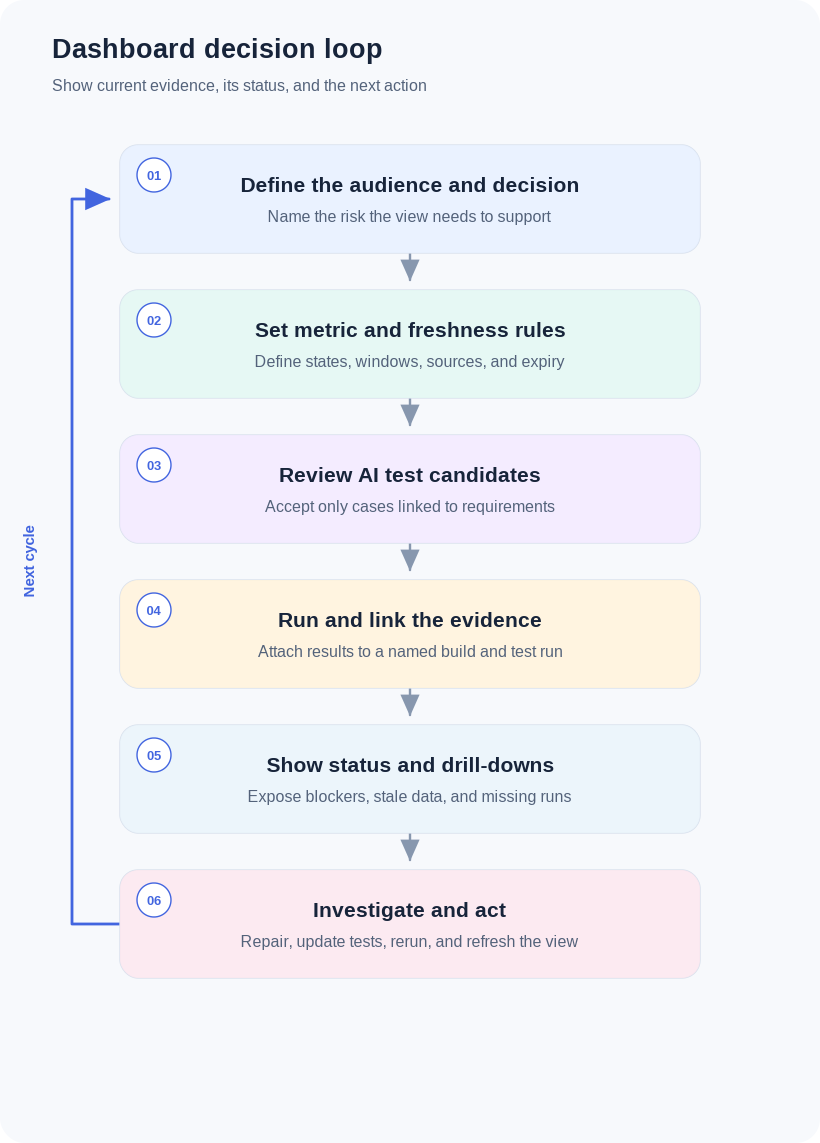
In daily testing, an AI-generated case stays a candidate until someone reviews and accepts it. The dashboard should show NOT_RUN until there is an execution record, then link the result to its requirement and build. A blocker, stale source, or failed run sends work back to investigation, repair, and another run. The owner uses that evidence to decide what happens next.
Related Skills
- Quality Metrics Design: https://inaodeng.com/en/qaskills/quality-metrics-design/ clarifies definitions and metric boundaries.
- Quality Gate Design: https://inaodeng.com/en/qaskills/quality-gate-design/ defines how evidence controls a delivery decision.
- Observability Design Review: https://inaodeng.com/en/qaskills/observability-design-review/ checks whether the underlying signals can be emitted and correlated.
Install and invoke
Install the individual Skill from the Awesome QA Skills repository:
npx skills add https://github.com/naodeng/awesome-qa-skills/tree/main/skills/en --skill quality-dashboard-designInvoke quality-dashboard-design with the intended audience, decision, dashboard plan, source definitions, time window, and known evidence gaps.
Use the quality-dashboard-design Skill.
Audience and decision: [who uses the dashboard and what they decide].
Dashboard plan: [panels, definitions, sources, groups, refresh window, and drill-down links].
Known constraints: [data freshness, privacy, and alert policy].
Review how missing, stale, zero-denominator, and high-risk subgroup data are displayed. Separate design findings from checks that require a running dashboard; do not approve a release.
FAQ
Can a quality dashboard approve a release?
No. It can present evidence for an authorized decision, but release policy and risk acceptance belong to the accountable owner.
How should missing or stale data appear?
Show the state and its last update explicitly. Do not substitute zero or an earlier green result for unavailable or stale evidence.
Should an AI-generated test appear as a pass on the dashboard?
No. Show it as a candidate or NOT_RUN until it has been reviewed, accepted, and executed. Link the result to its requirement and build so a reviewer can trace the evidence.
Source
Read the Quality Dashboard Design prompt: https://github.com/naodeng/awesome-qa-skills/tree/main/skills/en/testing-types/quality-dashboard-design/prompts/quality-dashboard-design.md before using the Skill. The worked decisions come from its sanitized synthetic fixture: https://github.com/naodeng/awesome-qa-skills/blob/main/skills/en/testing-types/quality-dashboard-design/references/domain-decision-example.md. Source directory: https://github.com/naodeng/awesome-qa-skills/tree/main/skills/en/testing-types/quality-dashboard-design.
- Skill details: https://inaodeng.com/en/qaskills/quality-dashboard-design/
More Resources
- Personal website: https://inaodeng.com/en/
- AI-generated test detection project: https://github.com/AI-Native-QA-Lab/ai-test-auditor
- DeepSeek QA Workbench: https://github.com/naodeng/dsh-qa
- More AI testing skills: https://inaodeng.com/en/qaskills/
- More testing wiki: https://inaodeng.com/en/wiki/
- More AI Wiki: https://inaodeng.com/en/AIWiki/